
Skip to content

Wedding venue SEO strategy

Regulated marketing

One wedding per date, so the unsold dates set the strategy

Written by Eugene SuslovLast reviewed 18 September 2026No affiliate links
Sector
Lifestyle and leisure
Model
Local service, Multi-location
Competition
High
Time to results
6 to 12 months
Typical monthly
$1,000 to $5,000

Key takeaways

  1. 1Every date sells once, and the in-season Saturdays sell themselves. Search earns its keep on the Fridays, Sundays, weekdays and winter dates that would otherwise stay empty.
  2. 2The dates that do not sell themselves are searched in their own words (weekday wedding, micro wedding, elopement) and fought over by hourly space marketplaces and elopement planners rather than by The Knot.
  3. 3Somebody else prints a price for your venue's name before you do. Marketplaces and pricing-packet sites answer the cost query because your price sits in a PDF behind an email form.
  4. 4In a handful of states the word you choose for a fee decides whose money it is. New York, Massachusetts, Hawaii and Washington reach the pricing copy, and Massachusetts reaches the enquiry form itself.
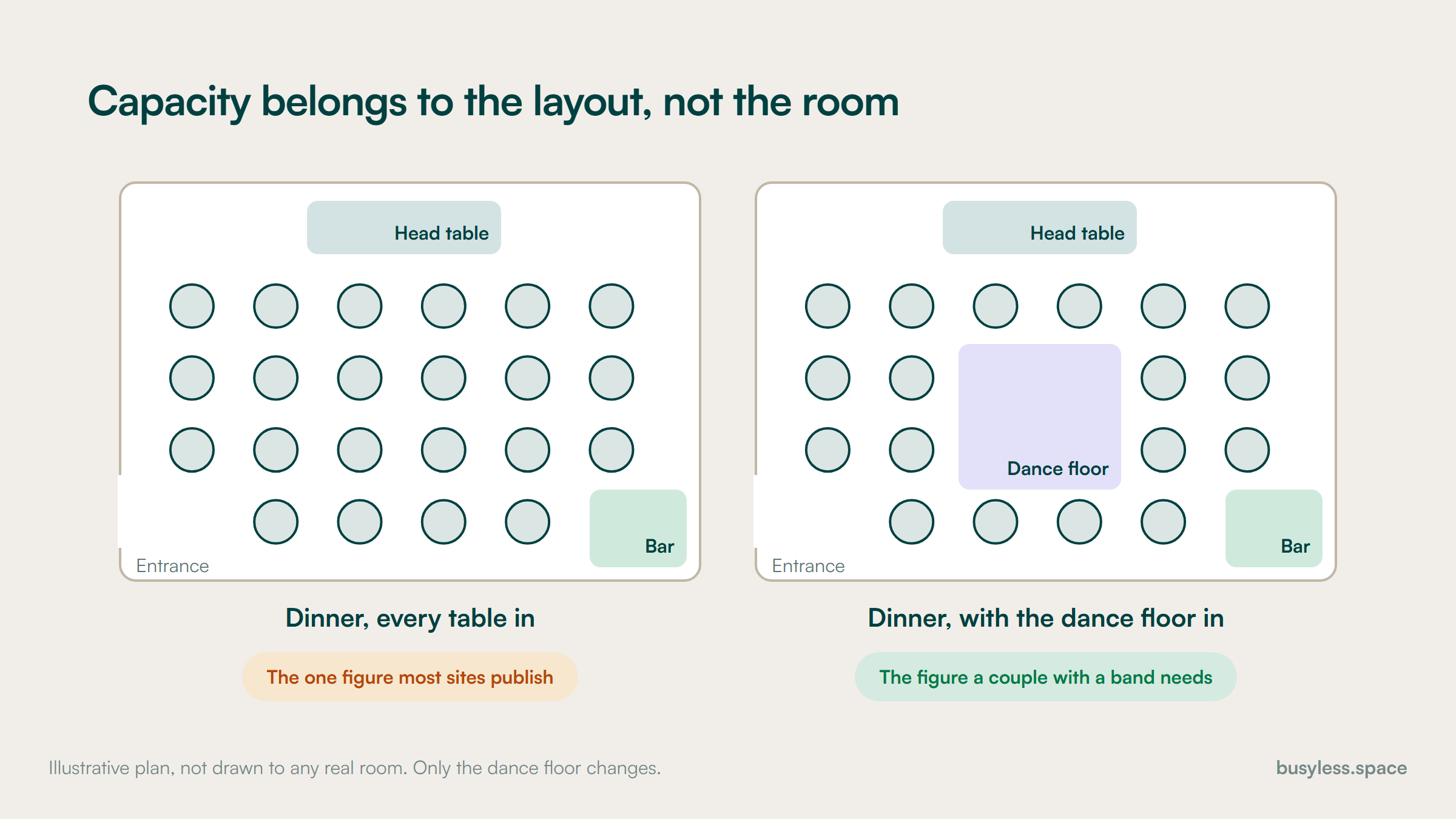
  5. 5Capacity belongs to the layout, not the room. One figure for the whole venue is true of one floor plan and misleading for every other.

SEO for wedding venues starts from an inventory problem rather than a traffic one. A venue holds one wedding per date, so each date sells once and the calendar is the thing being sold. A hotel sells hundreds of room nights on a wedding night, and the hotels playbook covers that business.

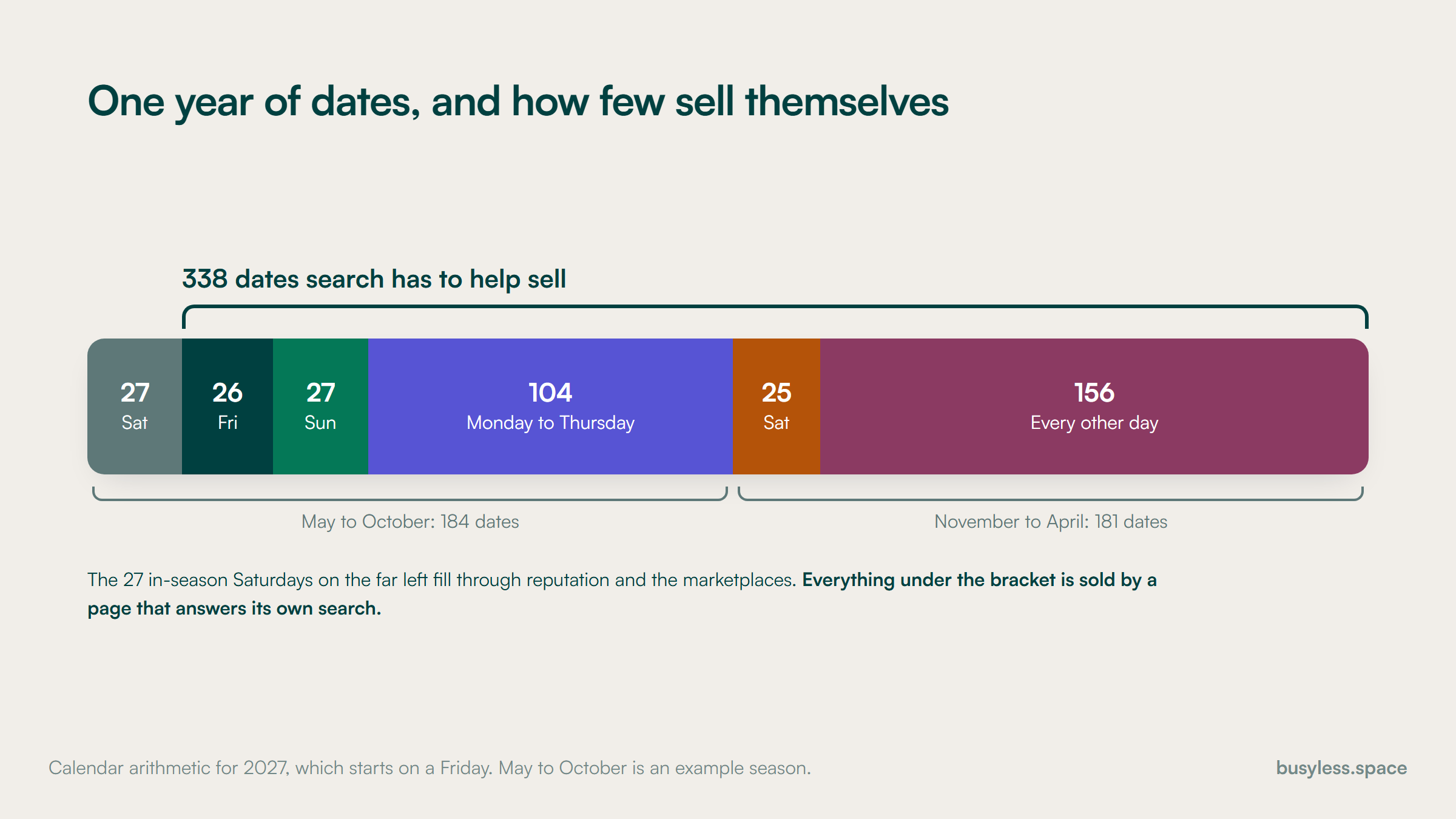
Those dates do not sell evenly. The Saturdays in the months couples want fill first and largely on their own, through reputation, the marketplaces and the photographers and planners who have worked there. Venues that publish their open dates show the pattern plainly: the peak Saturdays go early, and the Fridays, Sundays, weekdays and winter dates are what remain.

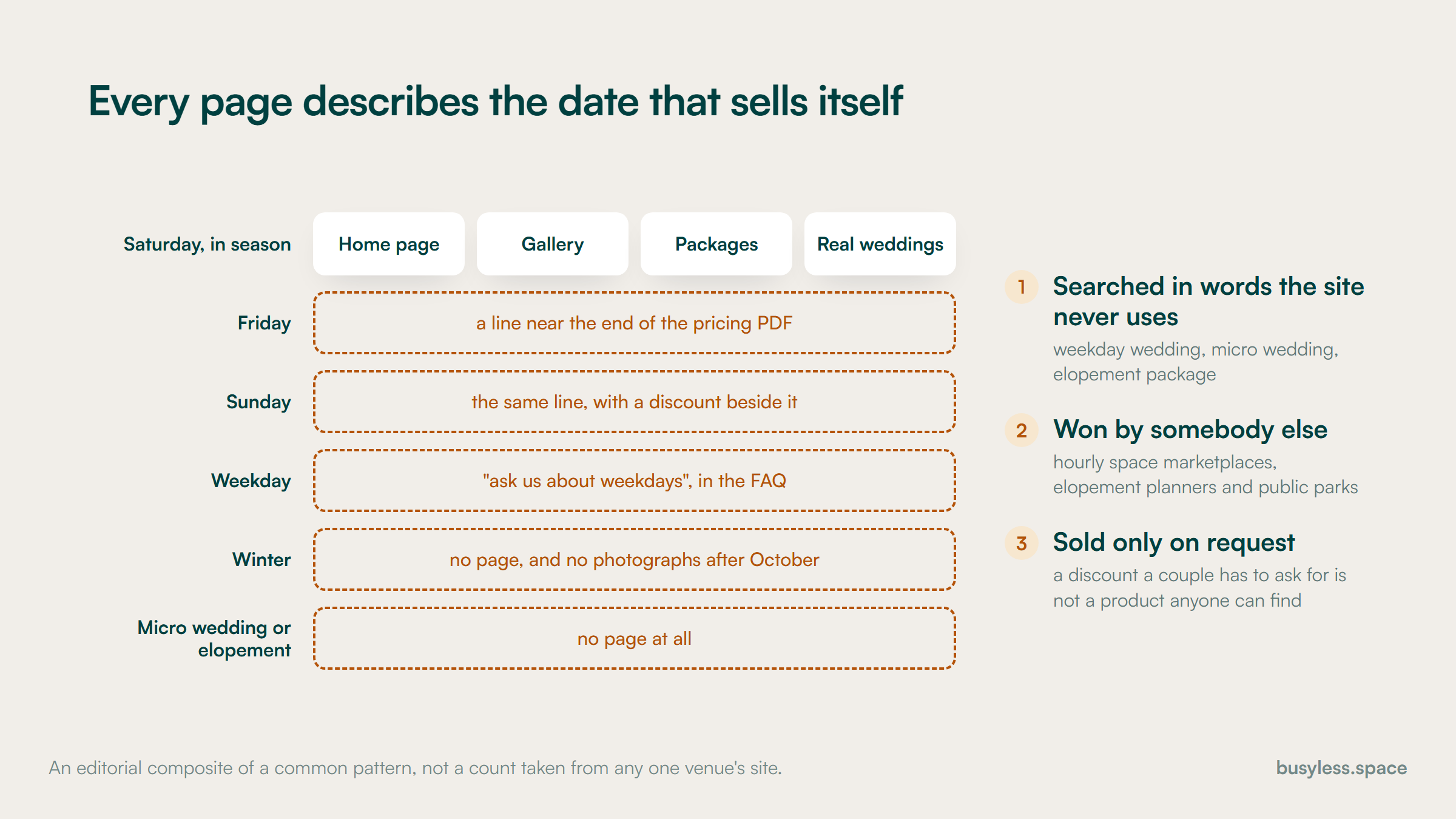
So a wedding venue SEO strategy is not a plan for more enquiries. It is a plan for enquiries about the dates still open, and those are searched in their own words: weekday wedding, micro wedding, elopement package, winter wedding, Sunday reception.

Different words bring different competitors. The Knot and WeddingWire hold the city head terms, but the off-peak formats are contested by hourly space marketplaces, elopement planners and public venues such as parks, and most venue sites have no page for any of them.

The photographers playbook treats a countable number of Saturdays as a ceiling, where a full season means stop spending. A venue has to read the same fact the other way round. The calendar is the product and the targeting principle at once, because the dates still open tell you exactly which searches to win.

Two further things make venues their own case. Marketplaces and pricing-packet sites print a price against your venue's name before your own site does. And in a handful of states, the label on a service charge, the order of the enquiry form and the size of a not-a-tip notice are all set by rule.

Who already ranks in wedding venues

Search your own venue's name with the word cost after it, then search your style of venue in your region, and count the results that are yours. Most wedding venue SEO begins with the discovery that marketplaces answer both, and that one of them is quoting a price you never gave it.

What is on the results page

  • Marketplace listing pages with starting-at prices on every city and style query
  • A local pack on wedding venues near me, sorted by reviews and distance
  • Marketplaces and pricing-packet sites above the venue on its own name plus cost
  • Photographers' and planners' pages between those results on the venue name
  • Image results carrying the setting queries: barn, garden, estate, waterfront
  • Hourly space marketplaces on micro wedding and small wedding queries
  • People Also Ask on average venue cost, all-inclusive packages and outside catering
  • AI answers shortlisting a region's venues and naming a handful with no link back
  • The Knot

    theknot.comClaim it

    Holds the city and style head terms, prints a starting-at figure on each listing, runs a sponsored band and indexes guest-count and price facets. Treat it as a channel priced per booked date, and make its starting figure agree with the total on your own site, because a couple compares the two.

  • WeddingWire

    weddingwire.comClaim it

    Owned by the same company as The Knot since the XO Group merger closed on 21 December 2018, so two listings are one landlord rather than two channels. Its forums still rank for policy questions such as outside catering, which is a free list of answers your own site is missing.

  • Zola

    zola.comClaim it

    A free listing with credits paid to connect with each lead. That makes it the one marketplace whose cost per connected lead can be set directly against enquiries from your own site, and it should be judged per booked date rather than per lead.

  • Wedding Spot

    wedding-spot.comClaim it

    Owned by Cvent since May 2019. It gives couples an instant estimate by guest count and date and ranks for the venue name plus pricing, so it is quoting your price whether or not you supplied one. Supply it, and date it.

  • Here Comes The Guide

    herecomestheguide.comClaim it

    A venue-only directory that publishes prices and filters such as bring-your-own catering. A paid listing, and the one where a stale figure does the most harm, because its readers are shortlisting on price before they ever reach your site.

  • Hourly space marketplaces

    peerspace.com, tagvenue.com, giggster.com

    They hold micro wedding venue and small venue by the hour, which are exactly the formats your open dates need to sell. Competitors for the off-peak inventory, and a cheap test of whether a weekday block sells at all before you write a page for it.

  • Pricing-packet aggregators

    weddingvenuecosts.com

    They publish what they call real pricing packets, venue by venue. A gated PDF gets published anyway, by somebody else and possibly two seasons out of date, and the only defence is a current total on a page of your own.

  • Photographers, planners and florists

    Their own sites

    They publish venue-name wedding pages and best-venues roundups, which is free content about your name that you do not control. The photographers playbook tells vendors to build pages about you; your list decides who does, and the florists playbook sends florists to the same pages.

One bar splitting the 365 dates of 2027 by day type and season, with the 27 Saturdays from May to October as a narrow band and the other 338 dates bracketed as what search has to sell
Calendar arithmetic for 2027, with May to October as an example season. Use your own season and the band that fills on its own stays narrow.

What people actually search

The clusters below are sorted by which dates they sell rather than by volume. The seo keywords for wedding venues that most sites chase all describe a full wedding on a peak Saturday, which is the product that needs search least. Date, format and policy queries are where the open calendar gets filled.

Setting and style

Commercial investigation, visual

barn wedding venues [region]

The page that wins it: A page per setting you genuinely offer, photographed in each season

The setting is the physical product, and the marketplaces hold these head terms with filters no single venue can match. A vineyard that hosts weddings runs two businesses, and the events side reads here; the wineries playbook covers the wine.

Guest count

Commercial, filtering

wedding venues for 150 guests [city]

The page that wins it: Capacity per space and per layout, stated as text

The Knot indexes guest-count facets, so the query is contested. The venue's advantage is precision: a couple with 150 guests and a dance floor needs the dinner figure with the floor in, which almost nobody publishes.

Budget and inclusions

Commercial, price led

all inclusive wedding venues [city]

The page that wins it: A pricing page showing the total by day type and season

Price is the query itself, which is exactly where the fee rules below bite. A page that answers it with a download form hands the answer to an aggregator.

Date and availability

Navigational, date specific

[venue] 2027 availability

The page that wins it: An open-dates page, dates as text by month and day type

The inventory is dates, so this is the query closest to a booking. A calendar that shows availability only as a colour answers it for nobody, including a couple using a screen reader.

Off-peak formats

Commercial, format led

weekday wedding venue [city]

The page that wins it: A page per format: weekday, Friday, Sunday, winter, micro wedding, elopement

The dates that do not sell themselves, searched in their own words and contested by hourly space marketplaces, elopement planners and public parks rather than by The Knot. Most venues have no page for any of them.

Policy and exclusivity

Commercial, eliminating

wedding venues that allow outside catering [city]

The page that wins it: A policies page covering catering, bar, vendors, curfew and sound

Exclusive catering, the bar licence and vendor rules are filters only a venue sets, and couples use them to cross venues off. Stating the rule plainly loses the wrong enquiries early, which is cheaper than losing them at the tour.

The venue name

Navigational, with a price attached

[venue] wedding cost

The page that wins it: The pricing page, plus real weddings filed by day type

A name query the marketplaces price and the vendors write about. It is the one cluster where the venue owns the entity outright and still usually loses the answer.

Guest logistics

Navigational, from guests

[venue] parking

The page that wins it: A guest information page: parking, shuttles, access, rain plan, nearby rooms

Every wedding sends its guest list to search the venue name, which makes this the biggest stream of non-sales queries a venue gets. The hotels playbook covers hotels near a venue from the other side.

A matrix of day types and formats against the pages a typical venue site has for each, with every page on the peak Saturday row and the Friday, Sunday, weekday, winter and micro wedding rows empty
The empty rows are the dates still for sale. Each needs a page of its own, because each is searched in different words and fought over by different sites.

What the rules change

The rules below reach a venue's pricing page, its enquiry form and its vendor list. Most of them start from wage law rather than advertising law, written with banquets and catering in view, which is why the name of a fee matters as much as its amount. They vary by state and several points are untested, so read this as my reading rather than legal advice, and check your own state.

1

In New York, a charge called service is presumed to belong to the staff

New York 12 NYCRR 146-2.18 and 146-2.19, current text effective 31 December 2016; Samiento v. World Yacht, Court of Appeals, 14 February 2008

What it means

Any charge beyond food, beverage, lodging and specified items, including one called service, is presumed to be a gratuity owed to staff. A banquet administration charge must be named as such, with a statement that it is not a tip in the contract and on any menu and bill listing prices, in ordinary language and never under 12-point.

So do this

Never call a fee the venue keeps a service charge. Put the not-a-tip statement on the package page and in the pricing PDF at body size. Whether a web page counts as a menu is untested, so take the conservative reading. Samiento settled what the law can reach on a pleading question, not anyone's liability.

2

In Massachusetts, one fee with two names becomes the staff's money

Massachusetts G.L. c.149 s.152A; Hovagimian v. Concert Blue Hill, 488 Mass. 237, Supreme Judicial Court, 23 August 2021

What it means

A fee a patron would reasonably expect to go to staff is a service charge, and the proceeds are theirs. A house or administrative fee escapes that only with a written description telling the patron it is not a tip. In Hovagimian a function business called one charge administrative in the contract and service on the invoice, and the court held it belonged to the servers.

So do this

Pick one name for each fee and use it identically on the website, the PDF, the contract, the invoice and the bill. Whether a web page counts as one of those documents has not been tested. Assume it does, because a site saying service where the contract says administrative is the drift the case punished.

3

Hawaii and Washington want the staff share as a number

Hawaii HRS 481B-14 and Rodriguez v. Mauna Kea Resort, Hawaii Supreme Court, 25 August 2025; Washington RCW 49.46.160, amended 2010

What it means

Hawaii requires a hotel or restaurant either to pay a food and beverage service charge to staff or to disclose that it covers other costs. In Rodriguez the court held that allocating a portion is not enough and approved a sample: a 22% charge, 18.7% gratuity and 3.3% retained. Washington requires the percentage paid to staff on any menu and itemised receipt.

So do this

State the split as numbers on the banquet menu and the pricing page, never as an adjective. Whether a stand-alone venue with in-house catering counts as a restaurant under the Hawaii statute is unconfirmed, so a venue selling there should ask counsel before assuming it does not.

4

In Massachusetts, the total price comes before the enquiry form

Massachusetts 940 CMR 38.04(4), effective 14 March 2025 and applying from 2 September 2025

What it means

It is unfair and deceptive to require personal information before clearly disclosing the total price, unless the information is needed to check availability. Every mandatory fee has to be named, with its purpose and amount, where the total first appears. The rule reaches any seller targeting Massachusetts consumers, wherever it sits, and it has no banquet carve-out.

So do this

Put the total for each day type on an open page and let the form ask for the date first, because the date is the one question the rule lets you ask before the price. Name, email and phone come after. No enforcement against a venue has been found, but the pricing-guide gate is the pattern the rule describes.

5

In California, the catering charge and the site fee follow different rules

California Civil Code 1770(a)(29), subparagraph (D) added by SB 1524; read 18 September 2026

What it means

A mandatory charge on food or beverage sold under a banquet or catering contract may sit outside the advertised price, but only if it is shown with its purpose explained wherever the menu price appears. A site, cleaning, security or coordinator fee is not food or beverage, so it belongs inside the hire price. California's restaurant clause belongs to the restaurants playbook; the banquet clause beside it is argued here.

So do this

Split the quote the way the law splits it: a hire price with every mandatory venue fee inside it, then the catering menu with the service charge and its purpose beside each price. The general all-in pricing rule behind this is covered on the small businesses and DTC ecommerce playbooks.

6

A paid preferred-vendor list is an endorsement and a paid link

FTC Endorsement Guides, 16 CFR 255.5(a); Google spam policies, page updated 28 August 2026

What it means

Where vendors pay to appear on your list, whether by annual fee or a cut of each booking, that connection is not what a couple expects and has to be disclosed clearly and conspicuously. Separately, Google treats a link bought for money as link spam unless it carries a nofollow or sponsored attribute.

So do this

Put one disclosure line at the top of the list saying which vendors pay and how, and mark the paid links rel="sponsored". Keep unpaid recommendations as ordinary links, so the list still tells a couple something about quality. No enforcement against a venue has been found; the rule applies all the same.

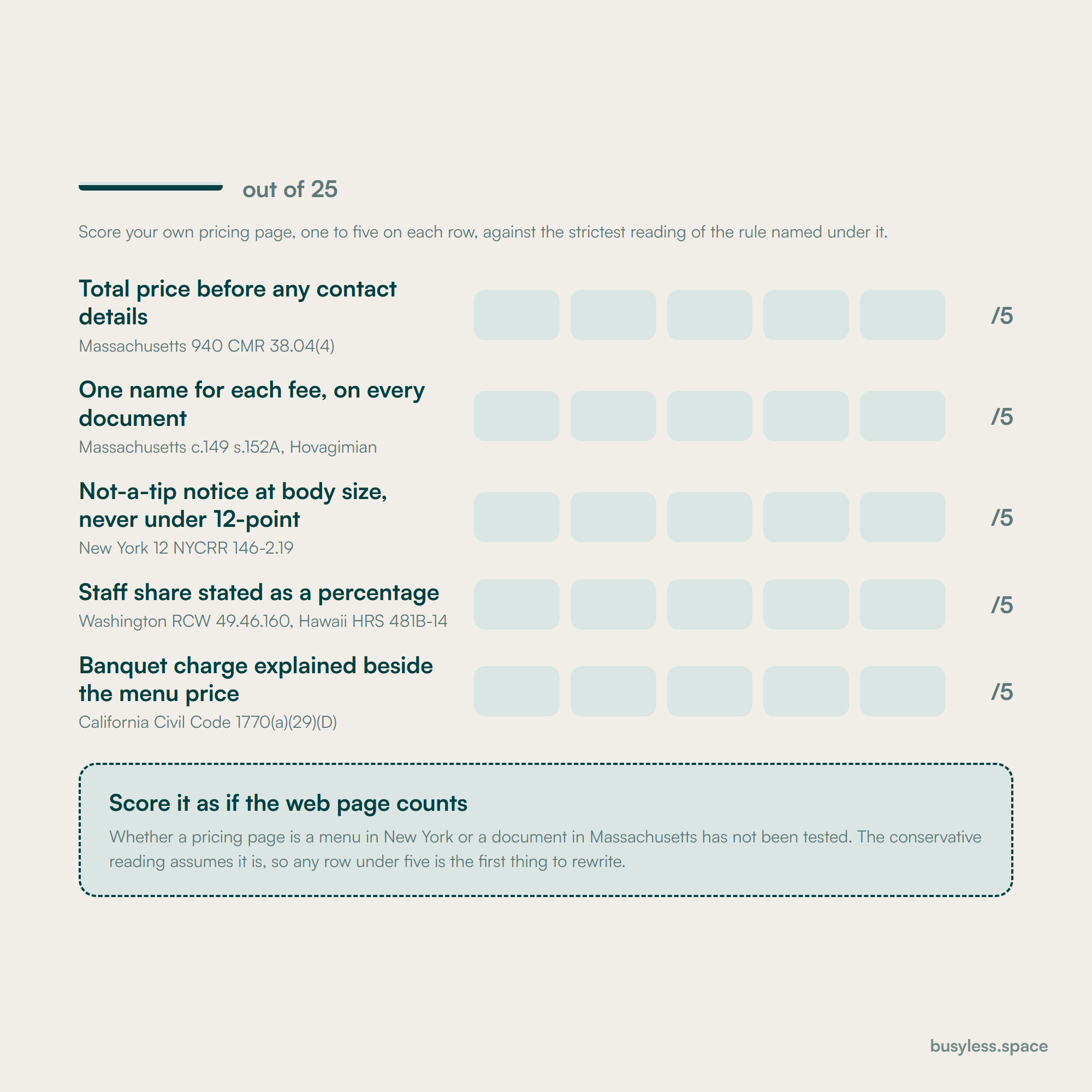
A blank scorecard for one venue pricing page, five rows drawn from five state rules, from the total before any contact details to the banquet charge beside the menu price, with every cell empty
Five rows drawn from rules in five states. The cells are blank on purpose: only you can score your own page, and the strictest reading is the safe one.

Proving expertise

Couples cannot tour twenty venues, so they shortlist on evidence they can check from home, and the planners who send couples to you are checking the same things. Proof here is specific to a date, a space and a headcount rather than to a reputation.

  • Real weddings filed by day type, season, space and guest count, not only by the couple's names
  • Capacity stated per space and per layout, with the floor plans that produce each figure
  • The total for each day type and season on a page, with every fee named the way the contract names it
  • A named coordinator, with how long they have run events at this venue
  • The photographer credited on every image, by name and with a link
  • Policies stated plainly: catering, bar licence, curfew, sound limits and vendor rules
  • The rain plan shown as a photograph of the actual wet-weather space set for dinner
  • Accessibility described concretely: step-free routes, accessible toilets, the ceremony surface

How to build a wedding venue SEO strategy

Begin with the calendar rather than the keyword list, because a wedding venue SEO strategy is only as good as its map of which dates are still for sale. Phase one below is a date audit and a pricing fix, and neither is a writing job.

  1. 1

    Weeks 1-3

    Map the open calendar and fix the price

    • List every date for the next two seasons by day type and status: booked, held or open
    • Publish the open dates as text, by month and day type, fed from the booking system
    • Move the total for each day type out of the gated PDF and onto a page
    • Give each fee one name and apply it on the site, the PDF, the contract and the invoice
    • Reorder the enquiry form so the date comes first and contact details come after the price

    You end up with
    A public list of open dates and a pricing page a couple can read without giving an email address

  2. 2

    Weeks 4-7

    Give each open day type a page of its own

    • Build a page for each format you want to sell: weekday, Friday, Sunday, winter, micro wedding, elopement
    • Write each one in the words it is searched in, with its price and its next open dates
    • Refile real weddings by day type, season, space and headcount, and link them to the matching page
    • Add Offer markup for each day type and season, carrying the total price

    You end up with
    A page for every kind of date you still need to sell, each with proof from a real wedding

  3. 3

    Weeks 8-10

    Take the venue name back

    • Make every marketplace's starting figure agree with the total on your own pricing page
    • Send current pricing to Wedding Spot and Here Comes The Guide, dated
    • Build one page per space, with capacity by layout and a written description beside any 3D tour
    • Publish the guest information page: parking, shuttles, access, rain plan, nearby rooms
    • Audit the preferred-vendor list for paid entries, then add the disclosure and the sponsored links

    You end up with
    The venue name answered by the venue, with the price and the logistics on its own domain

  4. 4

    Weeks 11-13

    Measure by booked date

    • Capture source and requested date on every enquiry, marketplace leads included
    • Report bookings by day type and season against the dates that were open
    • Replace any year-stamped dates page with the one durable URL
    • Choose next quarter's format page from the day type with the most dates left unsold

    You end up with
    A report that says which open dates search sold, rather than how many forms arrived

Technical fixes with the best payoff

Two habits cause most of the damage. The sites are built on design-led platforms, mostly Showit and Squarespace with venue templates bought off the shelf. And the commercial detail is kept out of the HTML on purpose, because the pricing guide doubles as the lead magnet.

  • Pricing lives in a gated PDF

    A day, then an update each season

    The pricing guide is the standard lead magnet, and template vendors sell playbooks for running it. So the HTML carries no price and no Offer markup, an aggregator prints a figure for the venue name instead, and in Massachusetts the gate itself is the pattern 940 CMR 38.04(4) describes.

    Publish the total for each day type and season as page text. Keep a PDF for the full menu if you want one, ungated, and let the form ask for the date first.

  • Availability is shown as colour only

    A template

    Booking-calendar plugins mark open and booked dates with CSS classes, so a crawler and a screen reader get the numbers one to thirty and nothing about which are free. Script-rendered calendar blocks can show even less.

    List the open dates as text by month and day type beside the calendar, generated from the booking system so the list cannot drift from the diary.

  • Showit's source order is not the reading order

    An afternoon per page

    Showit positions elements absolutely, so the HTML order can run backwards. On one venue's packages page the four booking steps read 04, 03, 02, 01 in the source, and its home page carried three H1s, two of them photographer credits.

    Read each key page with styles switched off and fix the element order in the editor. Keep exactly one H1 per page and move photographer credits into captions.

  • Several spaces share one capacity figure

    Two hours per space

    A venue with a barn, a garden and a terrace often publishes a single up-to number, although capacity depends on the layout: rows for a ceremony, rounds for dinner, a dance floor or not. A 3D tour iframe then stands in for a description no crawler can read.

    One page per space, with capacity per layout in a table and a written description beside any 3D tour.

  • Enquiries vanish into the CRM

    A sprint with the CRM

    The form is usually an embed from HoneyBook, Tripleseat, Perfect Venue or Planning Pod on another domain, and marketplace leads flow into the same system. Tripleseat integrates The Knot and WeddingWire directly. Without source and requested date captured, the site's share of booked dates is invisible.

    Add hidden source fields, record the requested date and day type on every lead including marketplace ones, and fire a conversion event when the form submits.

  • Real weddings are galleries with attachment pages

    An hour, then per post

    A real-wedding post is usually a gallery and the couple's names, and WordPress gives each image an attachment URL that can surface in place of the post. The photographers playbook covers the gallery problem; for a venue these posts are also the proof the off-peak pages need.

    Redirect attachment pages to their parent post, and file each real wedding by day type, season, space and headcount, with two paragraphs on how the day ran.

  • The dates page has a year in its URL

    An hour

    Venues publish a 2027 dates page as a new address each season, so it starts from nothing every year while last year's version lingers in results with sold dates on it. The florists playbook describes the same defect with occasion pages.

    One durable open-dates URL, updated in place from the booking system, with the year in the heading rather than in the address.

The same room drawn twice from above with identical doors, bar and head table; the left plan fills the floor with round tables and the right gives the centre to a dance floor, so fewer tables fit
One room, one change, two true capacities. Publish the figure for each layout, because the couple is planning one of them and not the other.

Structured data that applies here

The types below fit this industry specifically. Most of them earn no rich result on their own, which is worth knowing before anyone sells the work on that basis. What they do is describe the entity precisely, which matters for how search engines and answer engines resolve who you are.

  • EventVenue

    The home page, typed together with LocalBusiness

    Schema.org's own type for a building whose purpose is hosting events, under Place. Multi-typing it with LocalBusiness keeps the address and hours while adding capacity, amenities and the spaces inside it. It earns no rich result; it tells machines what the place is for.

    EventVenue.jsonld
    {
      "@context": "https://schema.org",
      "@type": ["EventVenue", "LocalBusiness"],
      "@id": "https://[YOUR-DOMAIN]/#venue",
      "name": "[VENUE NAME]",
      "url": "https://[YOUR-DOMAIN]/",
      "image": "https://[YOUR-DOMAIN]/[HERO-PHOTO].jpg",
      "telephone": "[+1 000 000 0000]",
      "address": {
        "@type": "PostalAddress",
        "streetAddress": "[STREET]",
        "addressLocality": "[TOWN]",
        "addressRegion": "[STATE]",
        "postalCode": "[POSTCODE]",
        "addressCountry": "[ISO COUNTRY CODE]"
      },
      "geo": {
        "@type": "GeoCoordinates",
        "latitude": "[LAT]",
        "longitude": "[LON]"
      },
      "maximumAttendeeCapacity": "[LARGEST HONEST FIGURE IN ANY LAYOUT]",
      "amenityFeature": [
        {
          "@type": "LocationFeatureSpecification",
          "name": "[Outside catering allowed]",
          "value": true
        },
        {
          "@type": "LocationFeatureSpecification",
          "name": "[Accessible ceremony site]",
          "value": true
        }
      ],
      "containsPlace": [
        { "@id": "https://[YOUR-DOMAIN]/spaces/[SPACE-SLUG]#place" },
        { "@id": "https://[YOUR-DOMAIN]/spaces/[SPACE-SLUG]#place" }
      ]
    }
  • Place for each space

    Each space page, linked from the venue by containsPlace

    The vocabulary has no property for a layout, so state capacity per layout in the description and keep maximumAttendeeCapacity for the largest honest figure. No rich result, but it stops a machine repeating one number for a barn, a garden and a terrace.

    Place for each space.jsonld
    {
      "@context": "https://schema.org",
      "@type": "Place",
      "@id": "https://[YOUR-DOMAIN]/spaces/[SPACE-SLUG]#place",
      "name": "[SPACE NAME] at [VENUE NAME]",
      "url": "https://[YOUR-DOMAIN]/spaces/[SPACE-SLUG]",
      "description": "[SPACE NAME] seats [N] for a ceremony in rows, [N] for dinner at round tables, and [N] for dinner with the dance floor in.",
      "maximumAttendeeCapacity": "[LARGEST FIGURE, IN THE LAYOUT NAMED ABOVE]",
      "photo": {
        "@type": "ImageObject",
        "contentUrl": "https://[YOUR-DOMAIN]/[SPACE-PHOTO].jpg",
        "creditText": "[PHOTOGRAPHER NAME]"
      },
      "amenityFeature": [
        {
          "@type": "LocationFeatureSpecification",
          "name": "[Step-free access from the car park]",
          "value": true
        },
        {
          "@type": "LocationFeatureSpecification",
          "name": "[Covered wet-weather ceremony space]",
          "value": true
        }
      ],
      "containedInPlace": { "@id": "https://[YOUR-DOMAIN]/#venue" }
    }
  • Offer with CompoundPriceSpecification

    The pricing page, one Offer per day type and season

    Carries the total the rules require, with the hire price and each charge named as components using the same labels as the contract. No rich result, and never Product markup for a date. Its real use is keeping every surface that reads your price on one figure.

    Offer with CompoundPriceSpecification.jsonld
    {
      "@context": "https://schema.org",
      "@type": "Offer",
      "name": "[Friday wedding, May to October]",
      "url": "https://[YOUR-DOMAIN]/pricing#[friday-season]",
      "offeredBy": { "@id": "https://[YOUR-DOMAIN]/#venue" },
      "priceCurrency": "[USD]",
      "validFrom": "[YYYY-05-01]",
      "validThrough": "[YYYY-10-31]",
      "priceSpecification": {
        "@type": "CompoundPriceSpecification",
        "price": "[TOTAL FOR THE STATED GUEST COUNT]",
        "priceCurrency": "[USD]",
        "priceComponent": [
          {
            "@type": "UnitPriceSpecification",
            "name": "[Venue hire, every mandatory venue fee included]",
            "price": "[HIRE PRICE]",
            "priceCurrency": "[USD]"
          },
          {
            "@type": "UnitPriceSpecification",
            "name": "[Catering, per guest]",
            "price": "[PRICE PER GUEST]",
            "priceCurrency": "[USD]",
            "referenceQuantity": {
              "@type": "QuantitativeValue",
              "value": "[GUEST COUNT]",
              "unitText": "guests"
            }
          },
          {
            "@type": "UnitPriceSpecification",
            "name": "[Administrative fee, retained by the venue, not a tip]",
            "price": "[AMOUNT]",
            "priceCurrency": "[USD]"
          }
        ]
      }
    }
  • Event, for public events only

    Open house and tasting evening pages

    Google's event guidelines, updated 8 September 2026, exclude events that need a membership or an invitation to attend, so a wedding is ineligible and marking one up misdescribes it. A public open house or tasting evening is a real event and can be marked up.

    Event, for public events only.jsonld
    {
      "@context": "https://schema.org",
      "@type": "Event",
      "name": "[Open house at VENUE NAME]",
      "url": "https://[YOUR-DOMAIN]/open-house",
      "description": "[What happens, who is there, and whether booking is needed]",
      "startDate": "[YYYY-MM-DDTHH:MM:SS-05:00]",
      "endDate": "[YYYY-MM-DDTHH:MM:SS-05:00]",
      "eventStatus": "https://schema.org/EventScheduled",
      "eventAttendanceMode": "https://schema.org/OfflineEventAttendanceMode",
      "isAccessibleForFree": true,
      "location": {
        "@type": "EventVenue",
        "name": "[VENUE NAME]",
        "address": {
          "@type": "PostalAddress",
          "streetAddress": "[STREET]",
          "addressLocality": "[TOWN]",
          "addressRegion": "[STATE]",
          "postalCode": "[POSTCODE]",
          "addressCountry": "[ISO COUNTRY CODE]"
        }
      },
      "organizer": {
        "@type": "Organization",
        "name": "[VENUE NAME]",
        "url": "https://[YOUR-DOMAIN]/"
      },
      "offers": {
        "@type": "Offer",
        "price": "0",
        "priceCurrency": "[USD]",
        "availability": "https://schema.org/InStock",
        "url": "https://[YOUR-DOMAIN]/open-house#book",
        "validFrom": "[YYYY-MM-DD]"
      }
    }
  • ImageObject with a photographer credit

    Real-wedding pages, one per image you use

    Credit the photographer in the markup as well as the caption, with creator, creditText and copyrightHolder. Google Images shows a credit line when these are supplied, and it is the honest half of republishing a vendor's work, which the photographers playbook covers from their side.

    ImageObject with a photographer credit.jsonld
    {
      "@context": "https://schema.org",
      "@type": "ImageObject",
      "contentUrl": "https://[YOUR-DOMAIN]/real-weddings/[SLUG]/[IMAGE].jpg",
      "name": "[Friday ceremony in the walled garden, October, 80 guests]",
      "creator": {
        "@type": "Person",
        "name": "[PHOTOGRAPHER NAME]",
        "url": "https://[PHOTOGRAPHER-DOMAIN]/"
      },
      "creditText": "[PHOTOGRAPHER NAME]",
      "copyrightHolder": {
        "@type": "Person",
        "name": "[PHOTOGRAPHER NAME]"
      },
      "copyrightNotice": "[Copyright YEAR PHOTOGRAPHER NAME]",
      "license": "https://[PHOTOGRAPHER-DOMAIN]/[licensing]",
      "acquireLicensePage": "https://[PHOTOGRAPHER-DOMAIN]/[contact]"
    }
  • FAQPage

    The pricing page and the policies page

    Valid markup for the questions a couple asks before touring: outside catering, curfew, the rain plan, what each fee is. Google stopped showing the FAQ rich result on 7 May 2026, so the value now is a clean question and answer structure for other readers, including assistants.

    FAQPage.jsonld
    {
      "@context": "https://schema.org",
      "@type": "FAQPage",
      "mainEntity": [
        {
          "@type": "Question",
          "name": "[Can we bring our own caterer?]",
          "acceptedAnswer": {
            "@type": "Answer",
            "text": "[Yes or no, any approved list, and any fee that applies.]"
          }
        },
        {
          "@type": "Question",
          "name": "[What is the administrative fee, and is it a tip?]",
          "acceptedAnswer": {
            "@type": "Answer",
            "text": "[What it covers, that it is retained by the venue, and that it is not a gratuity.]"
          }
        },
        {
          "@type": "Question",
          "name": "[What happens if it rains?]",
          "acceptedAnswer": {
            "@type": "Answer",
            "text": "[Which space the ceremony moves to, and its capacity in that layout.]"
          }
        }
      ]
    }

What it costs

These bands are editorial estimates for the work this page describes, not quotes. What moves a venue up a band is the number of spaces and formats it sells, because each open day type and each space is a page written from real weddings rather than generated.

Do it yourself

$0 to $300
  • Open dates published as text from the booking system
  • The total for each day type on a page, out of the PDF
  • One name for each fee, applied on every document
  • The business profile completed, space by space
  • The enquiry form reordered, date first

Who it suits

A single-space venue where the owner or coordinator can give a few hours a month, and where the calendar is already mostly full.

Where it stops

Format pages and real-wedding write-ups take more hours than a coordinator has in season, so the off-peak pages are the part that never gets written.

Lean

$1,000 to $2,500
  • A page per off-peak format, written from real weddings
  • One page per space, with capacity by layout
  • Marketplace figures reconciled with the pricing page each season
  • Source and requested date captured on every enquiry

Who it suits

A venue with open Fridays, Sundays or a quiet winter it wants filled, and someone who owns the booking system.

Where it stops

Search cannot make a date more desirable than it is. If winter does not sell at any price, the work moves to what the venue offers in winter, which is a product decision.

Funded

$2,500 to $5,000
  • Several spaces and formats run as separate pages, each with its own proof
  • Real weddings written up steadily and filed by day type
  • Pricing and fee copy checked against each state you sell into
  • Reporting by booked date, day type and source

Who it suits

A venue with several spaces, or a small group of venues under one owner, where each space keeps its own calendar.

Where it stops

A multi-venue group spread across several states outgrows this band, because every location needs its own pages, its own profile and its own fee copy.

How to do it with no budget

Almost all of this is information the venue already holds. The booking system knows which dates are open, the coordinator knows what every layout seats, and the price exists in a PDF that only needs to become a page.

  1. 1

    Publish your open dates as text

    Two hours, then weekly

    Your booking system and your website editor

    By month and by day type, exported from the booking system if it can, typed if it cannot. A calendar that shows availability only as a colour answers nobody; a list answers the query nearest to a booking.

  2. 2

    Put the total price on a page

    Half a day

    Your website editor and your current pricing guide

    The total for each day type and season, with every mandatory fee inside it and each one named. Keep the PDF for the full menu if you like, but take the email form off it.

  3. 3

    Give every fee one name

    Two hours

    Your contract, invoice template, PDF and website

    Read the fee's name in all four places and make them identical. If the venue keeps the money, do not call it a service charge anywhere, on any document.

  4. 4

    Reorder the enquiry form

    An hour

    Your CRM's form builder

    Date first, then day type and guest count, then contact details once the price is visible. The date is the one question a couple expects before a price, and in Massachusetts it is the only kind the rule allows.

  5. 5

    Complete the business profile, space by space

    Two hours

    Google Business Profile

    Categories, photographs of each space in each season, the rain plan and the accessibility attributes. It decides the local pack on wedding venues near me, and most venues upload the hero shots and stop.

  6. 6

    Make the marketplaces agree with you

    An hour a season

    Your The Knot, WeddingWire, Zola and Wedding Spot listings

    Check each starting-at figure against your own total and correct the ones that disagree. A couple shown two different prices for one venue tends to believe the higher one.

  7. 7

    Refile real weddings by day type

    Twenty minutes per wedding

    Your website editor

    Tag each with day, season, space and headcount, and add two paragraphs on how the day ran. The Friday and winter weddings are the proof an off-peak page needs, and they are usually filed under the couple's names.

The tool stack

Short, because the most useful data in this business already sits in the booking system. The tools below either expose what the calendar knows or find the words couples use for the dates you still need to sell.

  • Find how couples phrase the off-peak formats in your region

    Keywords EverywhereSEO APIRead the review

    Weekday, micro wedding, elopement and winter phrasings vary by region and carry small volumes, which suits a cheap annual credit pool better than a platform subscription. Check each format's wording before writing its page.

    Free routeSearch Console queries, plus the suggestions under the search box

  • Build a site that is mostly photographs, with real text in the HTML

    PlasmicHeadless CMSRead the review

    A visual builder suits a venue whose site is largely a gallery, and a built-in CMS can hold spaces, formats and real weddings as records. The test for any builder here is whether the text you type lands in the HTML in reading order.

    Free routeYour current builder, with pricing, dates and capacity typed as text rather than set in images

  • Capture source and requested date on every enquiry

    Your venue CRM: HoneyBook, Tripleseat, Perfect Venue or Planning Pod

    Marketplace leads land in the same system as website enquiries, so without a source field the site's share of bookings cannot be seen. The requested date matters as much as the source: an enquiry for a sold Saturday is not the same signal as one for an open Friday.

    Free routeHidden form fields and a column in a spreadsheet

  • Keep the local listing accurate for every space

    Google Business Profile

    Categories, seasonal photographs and the rain plan. The local pack for wedding venues near a town is decided here rather than on the website, and it takes an hour a season.

    Free routeFree

  • Track format and name queries apart from the head terms

    Search Console, with queries grouped into format, name and setting sets

    The head terms belong to the marketplaces and will move little. The format set is the one that says whether the off-peak pages are working, and the name set shows whether the pricing page is taking the cost query back.

    Free routeFree

  • See how assistants describe venues in your region

    A monthly manual check in the main assistants

    Couples increasingly ask a model for a venue shortlist. Record whether the answer names you, and which price it quotes, because a stale aggregator figure repeated by an assistant is the gated PDF problem in a new place.

    Free routeFree

  • Report bookings by day type against the open calendar

    A spreadsheet fed from the booking system

    Dates sold, by day type and season, against the dates that were open at the start of the quarter. It is the only report here that measures what the search work was for.

    Free routeFree

Take it from here

Each of these is meant to be filled in and put to work. Bodies are plain text, so what lands on the clipboard is exactly what you see, brackets included.

Brief

Turns the booking diary into the page that answers the availability query, with dates as text rather than colour.

OPEN DATES PAGE SPEC
Venue: [NAME]     URL: /dates     <- ONE DURABLE URL, NO YEAR IN IT
Owner: [NAME]     Source: [BOOKING SYSTEM]     Last synced: [DATE]

WHY THIS PAGE EXISTS
Every date sells once. A couple searching "[VENUE] availability"
is the closest thing to a booking this site gets, and a calendar
that shows availability only as a colour answers none of them.

THE RULES
  [ ] Dates as TEXT, never only as coloured cells
  [ ] Generated from the booking system, or updated every [DAY]
  [ ] Grouped by month, then by day type
  [ ] The year in the heading, never in the URL
  [ ] A held date shown as held, not as open
  [ ] Each day type links to its own format page and its price

H1
Open wedding dates at [VENUE NAME]

THE LIST
Month        Saturdays      Fridays        Sundays        Weekdays
[MON YYYY]   [ ......... ]  [ ......... ]  [ ......... ]  [ ......... ]
[MON YYYY]   [ ......... ]  [ ......... ]  [ ......... ]  [ ......... ]
[ REPEAT FOR THE NEXT TWO SEASONS ]

UNDER THE LIST, ONE LINE PER DAY TYPE
  Friday:    total from [PRICE]    link to /[fridays]
  Sunday:    total from [PRICE]    link to /[sundays]
  Weekday:   total from [PRICE]    link to /[weekday-weddings]
  Winter:    total from [PRICE]    link to /[winter-weddings]

THE ENQUIRY LINK
"Ask about this date" opens the form with the date already filled
in. The date is the first field; contact details come after the
price has been shown.

WHEN A DATE SELLS
  [ ] Remove it from the list within [N] days
  [ ] Do NOT delete the page or change its URL
  [ ] If one Saturday is left in a month, say so plainly

MARKUP
  [ ] Offer per day type and season, carrying the total price
  [ ] No Event markup for weddings: they are invitation-only

CHECK
Synced by: [NAME]     Next check: [DATE]

What to publish

Every asset below either sells a date that does not sell itself or answers a question a couple asks before touring. None of them is a general wedding planning article, because a venue has no advantage there and the marketplaces own that ground.

  • An open-dates page

    Synced weekly from the booking system

    The inventory itself, as text, by month and day type. It answers the query nearest to a booking and gives every format page something current to link to.

  • A page per off-peak format

    One per format you want to sell

    Weekday, Friday, Sunday, winter, micro wedding and elopement, each written in the words it is searched in, with the price and the open dates for that format.

  • Real weddings filed by day type

    Two a month through the season

    Proof that a Friday in November can look as good as a Saturday in June, written as how the day ran rather than as a gallery. They are the evidence the format pages cite.

  • One page per space

    Once per space, revised when a layout changes

    Capacity per layout, floor plans, seasonal photographs and the rain plan, so a couple can shortlist a space rather than a whole venue.

  • The pricing page

    Once, revised each season

    The total for each day type and season, fee names matching the contract, and the not-a-tip statement at body size. It is also the answer to the venue name plus cost.

  • The guest information page

    Once, checked before each season

    Parking, shuttles, accessibility, the rain plan and nearby rooms. Every guest list searches the venue name, and this page turns that traffic into fewer phone calls.

And what not to

  • General wedding planning checklists, which the marketplaces and magazines own outright
  • A new dates page on a new URL every year, which starts from nothing each season
  • Real-wedding posts that are a gallery and two names, with nothing a couple can use
  • Pricing in a PDF behind an email form, which hands the venue-name query to an aggregator
  • One capacity figure for the whole venue, true of one layout and wrong for the rest
  • A vendor list with paid entries and no disclosure line

The expensive mistakes

Measuring the programme on enquiries

Costs you An enquiry for a Saturday already booked counts the same as one for an open Friday, so the report rises while the empty dates stay empty.

Report booked dates by day type and season, against what was open. An enquiry is a leading indicator, not the result.

Gating the price behind a pricing guide

Costs you Couples who will not trade an email for a number leave, an aggregator prints a figure against your name instead, and in Massachusetts the gate is the pattern the rule describes.

The total on a page, ungated. Ask for the date first and contact details after the price.

Calling a retained fee a service charge

Costs you In New York and Massachusetts the word can make the fee the staff's money, and relabelling one document but not the others is the drift Hovagimian punished.

One name per fee, identical on the website, the PDF, the contract and the invoice, with the not-a-tip statement at body size.

Writing every page about the peak Saturday

Costs you The site describes the one date that sells itself and says nothing to a couple searching for a weekday or a micro wedding, who then book an hourly space or a park.

A page per open day type and format, priced, with real weddings from that day type as proof.

Publishing one capacity for the whole venue

Costs you A couple planning a dance floor and a head table works to a number that is only true of ceremony rows, discovers it at the tour, and the visit was wasted on both sides.

Capacity per space and per layout, in a table, with the floor plans that produce each figure.

Letting the vendor list sell links quietly

Costs you A list vendors pay for, with no disclosure and followed links, is an undisclosed endorsement and a link scheme at once, on the page other vendors most want to be on.

Disclose which entries are paid, mark those links rel="sponsored", and keep unpaid recommendations as ordinary links.

What to measure

The unit here is the booked date, and it has to be reported by day type, because a booked Saturday in June and a booked Tuesday in February are different achievements. Weddings are booked well ahead of the date itself, so read every number below against a long lag.

Leading indicators

Move first. They predict, they do not prove.

  • Impressions and clicks on format queries

    Search Console, filtered to the format set

    Weekday, Friday, micro wedding, elopement and winter phrasings, tracked apart from the head terms. It is the first sign the format pages are being found at all.

  • Enquiries by requested day type

    The CRM, with the requested date on every lead

    An enquiry for an open date and one for a sold date are different signals. Split them before reading the total, or the report rewards interest in dates you cannot sell.

  • Pricing page views against enquiry starts

    Analytics

    Once the price is public, the couples who enquire have already seen it. Fewer and better enquiries is the expected shape, and it looks like a fall if you only count forms.

  • Profile calls, direction requests and clicks

    Google Business Profile insights

    Read against the same months last year rather than last month, because wedding search keeps its own seasons.

Business indicators

The ones a manager acts on.

  • Dates booked, by day type and season

    The booking system

    The main number. Report in-season Saturdays, Fridays, Sundays, weekdays and off-season dates as separate lines, each against what was open at the start of the period.

  • Open dates left for the next two seasons

    The booking system

    The inventory still for sale. It tells next quarter's plan which format page to write or improve, which makes it a targeting list as much as a result.

  • Bookings by source: website against each marketplace

    The CRM, with a source field on every lead

    Set against what each marketplace costs per booked date. Attribution is never perfectly clean here, because a couple may find you on a marketplace and enquire on your own site.

  • Revenue per booked date, by day type

    Contracts and invoices

    Off-peak dates sell for less, so a count alone can hide whether the calendar is filling at a price worth having.

The verdict

Most wedding venue SEO services pitch more enquiries, and the pitch misreads how a venue fills. The peak Saturdays arrive through reputation, marketplaces and vendors whatever the website does. What stays empty are the dates nobody has written a page for.

So the work starts with the calendar. Publish the open dates as text, put the total on a page with one name for every fee, and give each open day type and format its own page in the words couples actually use.

Then take the venue name back from the sites quoting it. Make every marketplace figure agree with your own, answer capacity per space and per layout, and file real weddings so that a Friday in November has proof of its own.

Good SEO services for wedding venues are therefore judged on dates sold, by day type, against the dates that were open. Anyone reporting enquiries alone is measuring the part of the calendar that was going to sell anyway.

FAQ

Wedding venues SEO questions

  • What does wedding venue SEO cost?
    The bands above are editorial estimates rather than quotes. A venue running this properly is realistically looking at $1,000 to $5,000 a month, moved mostly by how many spaces and formats it sells. A multi-venue group across several states sits above that range.
  • Should a wedding venue publish its prices?
    Yes, as a total for each day type and season. Marketplaces and pricing-packet sites already print a figure against your name, often out of date. In Massachusetts, asking for contact details before showing the total has been an unfair practice since 2 September 2025. A public price also filters out couples who were never going to book.
  • Is a wedding venue's service charge the same as a tip?
    It depends on the state and on the word. In New York a charge called service is presumed to belong to the staff, and in Massachusetts so does a fee a patron would expect to reach them. Hawaii and Washington want the staff share stated as a number. Check your own state; this is not legal advice.
  • What may a venue's enquiry form ask before showing the price?
    The date, and anything genuinely needed to check availability, such as the day type or the space. The Massachusetts rule forbids requiring personal information before the total is shown, except to check availability. Name, email and phone come after the price.
  • Why does The Knot outrank my venue for my own name?
    Because it has a page for your name with a price, photographs and reviews on it, and your site often offers a gallery and a form. Publish the total, the capacities and the open dates as text, so the query has something only you can answer. The marketplace listing will still rank; the aim is to rank beside it.
  • How should a venue list capacity for each space?
    Per space and per layout: ceremony rows, dinner at round tables, dinner with a dance floor, a standing reception. One up-to figure is true of one floor plan, and the couple planning a different one finds out at the tour.
  • Can a wedding be marked up as an event?
    No. Google's event guidelines exclude events that require an invitation to attend, and a wedding is invitation-only. Mark up the open house or the tasting evening instead, since anyone may come to those. The weddings themselves belong on real-wedding pages, with the photographer credited on each image.
  • Does the FTC fees rule apply to wedding venues?
    Mostly not. 16 CFR Part 464, in force since 12 May 2025, covers live-event tickets and short-term lodging. A wedding is invitation-only and ticketless, so the rule reaches a venue through on-site rooms sold with the package, and the hotels playbook covers it. The state rules above are the ones that reach a venue's pricing page.
  • Can a wedding venue run this without outside help?
    Mostly, yes. Local SEO for wedding venues is the business profile, the open dates and a pricing page, and a coordinator can do all three in the quiet months. Bring help in when the off-peak format pages need writing, because that is the part a coordinator in season never reaches.
  • What should a wedding venue ask a provider before hiring one?
    How they will report, and walk away from anyone who answers in enquiries. Then which dates they would target first, whether they know the fee rules in the states you sell into, and what they would do with the pricing PDF. Do not hire before your open dates and prices are public; that part is yours to fix.

Run it yourself, or have someone own it

Everything above is written to be run without us, and the free path is genuinely most of the value for a single-location business. Where these plans stall is almost never the plan. It is that nobody owns it after the first month. That is the job we do, with search as one distribution layer inside a wider system rather than the whole engagement.