
Skip to content

Photography SEO strategy

The portfolio that sells is what makes the site slow

Written by Eugene SuslovLast reviewed 28 August 2026No affiliate links
Sector
Lifestyle and leisure
Model
Local service, National service
Competition
High
Time to results
4 to 10 months
Typical monthly
$500 to $3,000

Key takeaways

  1. 1Your best work is the reason the site is slow. That trade-off is real and it is solvable, but only if somebody treats image delivery as a craft rather than an upload.
  2. 2Venue names are the most underused query in this industry. Low competition, high intent, and you already own the only content that can win them: photographs taken there.
  3. 3Preferred-vendor lists are free, authoritative, and the actual booking mechanism in a large part of this market. You get on them by doing good work at the venue and then asking.
  4. 4If a second shooter took the frame, copyright probably vests in them unless your contract says otherwise. Check before your portfolio turns out not to be yours.
  5. 5A full-screen slideshow home page with no text on it cannot rank for anything. It is the single most common structural problem on photography websites.

SEO for photographers has a conflict at the centre of it that no other industry in this directory has to resolve. The thing that sells the work is a large, beautiful image, and a large, beautiful image is what makes a page slow.

Everyone else can compress and move on. Here the images are the offer, so the answer is not fewer or smaller pictures. It is treating delivery as a craft: modern formats, sized correctly for the device, the first one loaded eagerly and the rest not.

The second problem is that most photography websites have no words on them at all. A photography SEO strategy usually begins by admitting that a full-screen slideshow with a logo over it gives a search engine nothing whatsoever to work with.

Then there is the platform question. In wedding and portrait work the marketplaces and the social platforms own a great deal of discovery, and it is easy to conclude that a website is decorative. That is a mistake, but not for the reason people usually give.

It is a mistake because there is a whole layer of demand the platforms do not serve: venue names, planning questions, style terms and session-type queries. Those are low competition, they are searched by people who have already decided to book somebody, and you are unusually well placed to answer them.

The last structural fact is timing. Weddings book twelve to eighteen months ahead and portrait work has its own seasons, so the content that produces enquiries next spring has to exist this autumn. This is a business where being late by a quarter costs a year.

Who already ranks in photography

Photography SEO looks discouraging on a genre query and encouraging on a venue name: the genre query is marketplaces and directories all the way down, and the venue name is often a thin page and a couple of blog posts.

What is on the results page

  • Wedding marketplaces occupying almost the entire first screen on genre-plus-city queries
  • Local pack on photographer-plus-city queries, usually thinner than in the service trades
  • Image results high on the page for style, venue and session-type queries
  • Pinterest ranking widely on inspiration and planning terms
  • People Also Ask, dense on cost, timeline and what-to-wear questions
  • Venue websites and blogs on venue-name queries, frequently beatable
  • AI Overviews on planning questions, drawn from whoever wrote a genuinely useful guide
  • Venue preferred-vendor lists

    theknot.comClaim it

    The most valuable free asset in this industry and the one nobody treats as SEO. Venues publish recommended photographer lists, those pages rank for the venue name, and being on one is both a link and a direct referral channel. You get on it by shooting well at the venue, sending the coordinator a gallery they can use, and asking. Most photographers do the first, occasionally the second, and almost never the third.

  • Wedding marketplaces

    weddingwire.comClaim it

    The Knot, WeddingWire, Zola and their regional equivalents dominate genre-plus-city queries and are effectively paid placement above a free tier. Price them as a channel with a cost per booked wedding, and be aware you are also paying to appear on a page listing forty competitors.

  • Pinterest

    pinterest.comClaim it

    Treat it as a search engine rather than as social media, because that is how it is used in this market. It ranks in general search results for inspiration and planning terms, images are the unit, and pins have a long life. It is one of the few platforms where a photographer's raw material is exactly what the platform wants.

  • Editorial publications and blogs

    junebugweddings.com

    Feature-driven rather than claimable, and the main link-building route in this industry. A published feature is a genuine editorial link from a high-authority domain, and the submission process is a real workflow rather than an outreach email. Read each publication's actual submission requirements before shooting for them.

  • Google Business Profile

    google.comClaim it

    Worth completing properly even for a business with no storefront. Service area, categories, services and photographs all matter, and it is one of the few places your own images appear without a platform between you and the viewer.

  • Commercial representation directories

    behance.netClaim it

    For commercial, editorial and architectural work the discovery route is different: portfolio platforms and representation directories that art buyers and agencies actually browse. Lower volume, much higher value per booking, and a completely separate profile from the consumer marketplaces.

  • Client gallery platforms

    pixieset.com

    Not a gatekeeper in the usual sense and worth naming because of what it costs you. Delivery platforms host client galleries on their own domain, so the pages your clients share most enthusiastically build authority for somebody else. Where the platform supports a custom domain, use it.

What people actually search

Photography search has one cluster that everybody competes for and several that almost nobody does. The genre-plus-city query is the one everybody buys; the venue names, planning questions and style terms are the ones that are actually available.

Genre plus city

Local commercial

wedding photographer [city]

The page that wins it: A genre page, and realistic expectations about it

The most contested query in the industry, occupied by marketplaces. Worth a good page, not worth building the whole strategy on.

Venue name

Local commercial

[venue name] wedding photographer

The page that wins it: A page per venue you have actually shot at, with the photographs

The best available opportunity here. Low competition, high intent, and the only content that can win it is content you already have.

Price

Commercial investigation

how much does a wedding photographer cost in [city]

The page that wins it: A pricing page with real starting figures and what changes them

Searched constantly and answered by aggregators. Photographers resist publishing prices harder than almost any other industry here, and it costs them enquiry-handling time every week.

Style

Commercial investigation

documentary wedding photographer [city]

The page that wins it: A page explaining what the style actually means in practice

Highly qualifying. Somebody searching a style already knows what they want, and a page that shows rather than asserts converts unusually well.

Planning and advice

Informational

wedding photography timeline for a [x] hour day

The page that wins it: A genuinely useful planning guide, not a thin blog post

The top of the funnel, months before booking, and the cluster where a photographer's practical knowledge is worth the most and is published the least.

Session type

Local commercial

newborn photographer near me

The page that wins it: A page per session type with pricing, duration and what to expect

Portrait and family work behaves more like a local service business than weddings do, and the pages are usually missing entirely because everything sits under one gallery.

Commercial and editorial

Commercial investigation

product photographer for ecommerce [city]

The page that wins it: A separate section written for a buyer, not a couple

Different buyer, different vocabulary, different money. Usually buried under wedding content or absent, which means those queries go to whoever built a page.

Licensing and usage

Informational

what is a photography usage licence

The page that wins it: A plain explanation of how licensing works on your commercial work

Read by the people with the largest budgets, and almost nobody explains it. It also pre-empts the most common commercial negotiation before it starts.

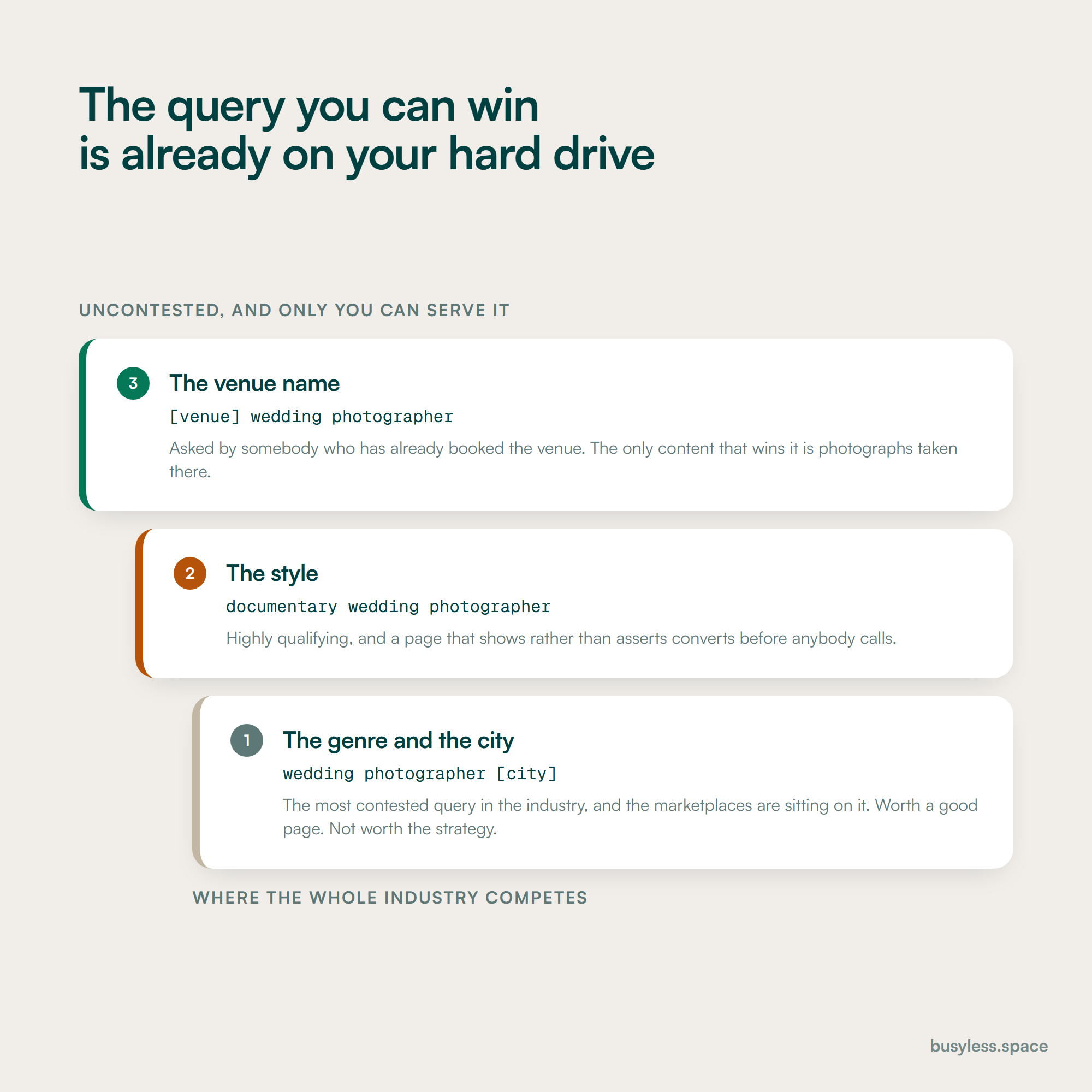
A three-rung ladder of query types. At the bottom, genre plus city, the most contested query in the industry. In the middle, style, which is highly qualifying. At the top, the venue name, uncontested and winnable only with photographs taken there.
The top rung is the argument: the only content that can win a venue query is content already sitting on your hard drive.

What the rules change

This is a lightly regulated industry and this section is honest about that: there is no board reviewing your advertising. What there is instead is a set of rights questions that decide whether your portfolio is legally yours to publish, and those matter more here than any advertising rule would.

1

If a second shooter took the frame, it may not be yours to publish

United States copyright law; copyright generally vests in the author of the work

What it means

Copyright in a photograph generally belongs to the person who took it, unless it is a genuine work made for hire or copyright has been assigned in writing. A great many photographers publish portfolio work shot by second shooters, assistants and associates under loose or verbal arrangements. If a relationship ends badly, the portfolio is the thing at risk.

So do this

Put a written agreement in place with every second shooter and associate that clearly addresses ownership or grants you the licence you actually need, including for marketing and for publication features. Do it before the shoot, not after. Then audit what is already on your site against the agreements you actually hold.

2

Publishing a client's photographs needs their permission, and your contract is where it comes from

State right of publicity and privacy laws; your own client contracts

What it means

You may own the copyright and still not be free to use an image commercially, because the person in it has rights of their own that vary by state. Weddings, portraits, newborn and school work all involve identifiable people, and minors need parental consent. Clients who later ask for images to be removed are common and the awkward version of this is discovering there is nothing in writing.

So do this

Have an explicit marketing and portfolio clause in the client contract naming the surfaces you will use: website, social, submissions to publications, print. Give clients a clear way to opt out, honour it quickly, and keep a record of who has. Never publish images of minors without documented parental consent.

3

Reviews cannot be bought, and the discount habit is common here

Federal Trade Commission Rule on the Use of Consumer Reviews and Testimonials, final rule 2024, and the FTC Endorsement Guides

What it means

Offering a discount, a print credit or an album upgrade in exchange for a review is an incentive, and incentivising reviews conditioned on sentiment is what the 2024 rule addresses. This is a widespread habit in wedding and portrait photography, usually offered informally at delivery and without anybody thinking of it as a policy.

So do this

Ask everybody, at the same point, with the same message, and offer nothing in return. If you do run any kind of referral incentive, keep it entirely separate from reviews and disclose it clearly where it applies.

4

Your images are being used to train models, and you can say something about it

Robots exclusion directives and the published crawler names of the major AI companies; emerging content provenance standards

What it means

Image-heavy sites are attractive to automated collection, and several AI companies publish crawler user agents that can be disallowed. Separately, provenance standards are emerging for signalling whether an image was generatively edited. Neither is settled law and both are decisions a photographer should make deliberately rather than by default.

So do this

Decide whether to allow AI crawlers and implement it in robots.txt with the current published user agent names. If you use generative editing on client or commercial work, be straightforward about it with the client, particularly on commercial jobs where the buyer may have their own disclosure obligations.

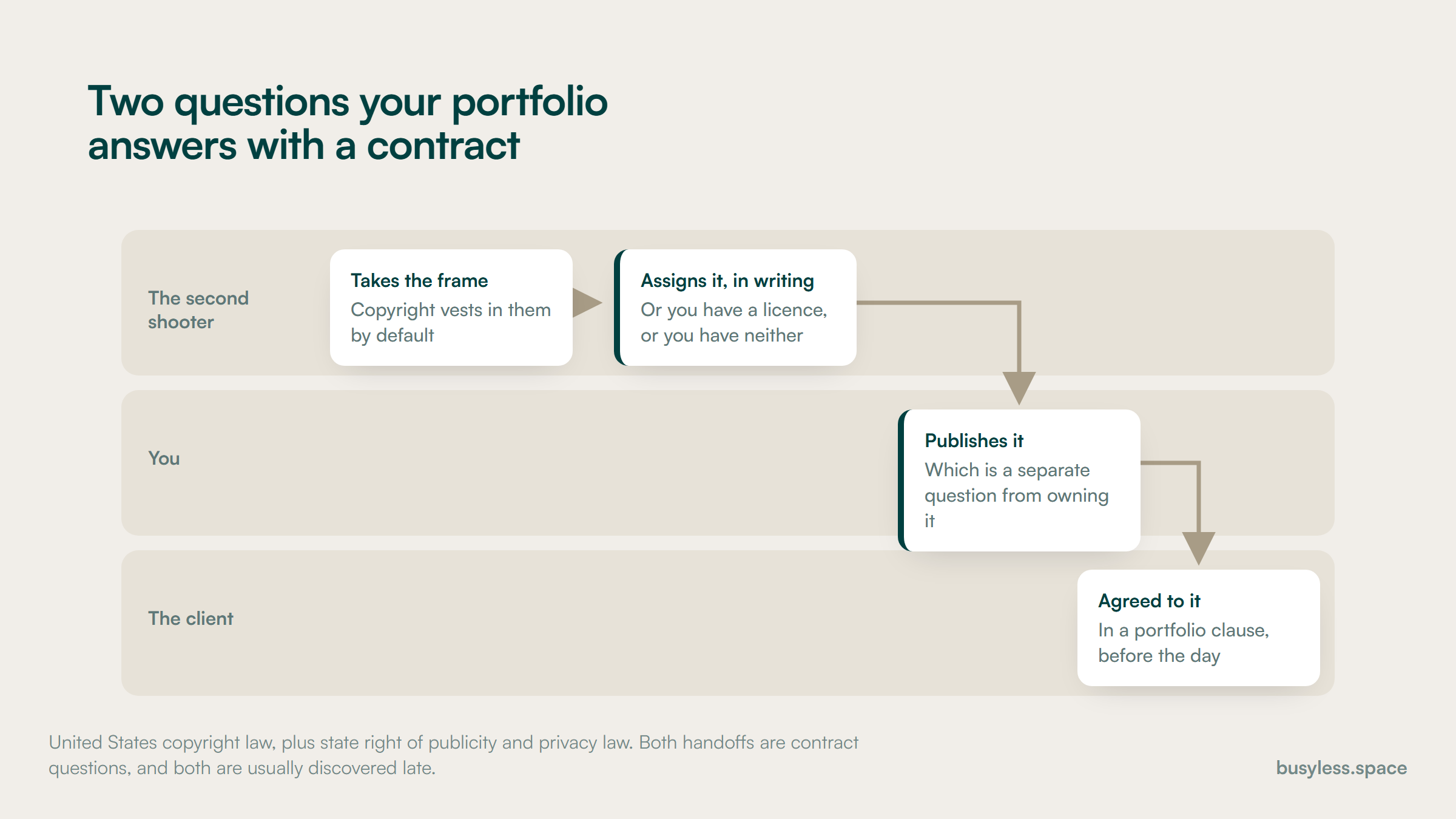
Three lanes. A second shooter takes the frame and copyright vests in them by default, then assigns it in writing. You publish it, which is a separate question from owning it. The client agreed to that in a portfolio clause before the day.
Two handoffs, both settled by a contract, and both usually discovered late.

Proving expertise

There is no licence in this industry, so credibility comes from evidence of work delivered rather than from credentials. The good news is that photographers hold more provable evidence than almost any other business here and publish less of it.

  • Complete work published rather than highlight reels, so a reader can see a whole event rather than six frames
  • Venues, locations and dates named where the client is comfortable with it
  • The photographer named and photographed, since clients are hiring a person who will be in the room all day
  • Years shooting, and roughly how many of this kind of job you have done
  • Insurance stated, which venues require and clients rarely think to ask about
  • Backup and redundancy explained: dual card slots, offsite copies, how long you keep files
  • Contingency stated plainly: what happens if you are ill on the day
  • Publication features and preferred-vendor listings linked rather than shown as logos

How to build a photography SEO strategy

A realistic first six months, sequenced against the booking calendar rather than a generic one. A photography SEO strategy has to be ahead of the season it serves, because a wedding booked next June is being researched now.

  1. 1

    Weeks 1 to 3

    Make the site something a search engine can read

    • Put real text on the home page, beyond a slideshow and a logo
    • Fix image delivery: modern formats, responsive sizes, dimensions set, correct loading order
    • Write alt text that describes the photograph rather than repeating a keyword
    • Complete the Google Business Profile with services, service area and your own images
    • Move client galleries onto your own domain where the platform supports it
    • Audit the portfolio against your second-shooter agreements

    You end up with
    A site with words, images that load, and a portfolio you are certain you may publish

  2. 2

    Weeks 3 to 8

    Build the pages nobody else is building

    • One page per venue you have genuinely shot at, with the photographs and practical detail
    • A page per session type or genre you actually want more of
    • The pricing page, with real starting figures and what moves them
    • Style pages that show what the term means rather than asserting it
    • Add ProfessionalService and image licensing structured data
    • Ask every venue you have shot at to add you to their vendor list

    You end up with
    Coverage of the venue and session queries, plus a set of vendor-list requests in flight

  3. 3

    Weeks 6 to 16

    Own the planning cluster and the proof

    • Write the planning guides: timelines, what to wear, light and time of day, family group lists
    • Publish complete events rather than highlight selections
    • Build the commercial section for a buyer rather than a couple
    • Write the licensing explainer for commercial clients
    • Submit work to publications properly, following their actual requirements
    • Set up Pinterest deliberately, as a search channel rather than a social one

    You end up with
    Top-of-funnel coverage a year ahead of the bookings it produces

  4. 4

    Weeks 12 to 26

    Measure enquiries and booked dates

    • Track enquiries by source and by genre, with a consistent question on the form
    • Track booked dates and average booking value rather than sessions
    • Compare marketplace cost per booking honestly against everything else
    • Report leading and business indicators separately with the attribution gap stated
    • Review pricing pages at least yearly, and before each season
    • Keep adding venue pages after every new venue

    You end up with
    An honest comparison of the marketplaces against your own site, by booked date

Technical fixes with the best payoff

This is the most technically distinctive industry in the directory, because the performance problem and the product are the same object. Everything below is about resolving that rather than pretending it does not exist.

  • The images are far too heavy

    A sprint, and it is the highest-value technical work here

    Photographers export at print quality and upload without resizing, so a gallery page can run to tens of megabytes. The people browsing are on phones, often on cellular, and the largest image is usually the one that has to render first.

    Serve modern formats, generate responsive sizes and let the browser choose, set width and height so the layout does not jump, lazy-load everything below the fold, and do not lazy-load the first image. That last one is the mistake most often made while trying to fix this.

  • The home page is a slideshow with no text

    A day

    A full-screen carousel with a logo over it contains no words, no headings and no context. There is genuinely nothing for a search engine, or an assistant, to understand about who you are or where you work.

    Keep the images and add real content underneath: what you photograph, where, in what style, at what starting price, and links to the venue and genre pages. It does not have to spoil the design; it has to exist.

  • Client galleries live on the platform's domain

    An afternoon, once

    The pages your clients share most enthusiastically, with the most emotional engagement and the most inbound links, are building authority for a gallery platform rather than for you.

    Use the custom domain option where your platform supports it, so galleries sit on your own subdomain. Where it does not, at least link back to relevant venue and genre pages from the gallery cover.

  • Alt text is missing or stuffed

    Ongoing, a few seconds per image

    Image results are a real channel here, and alt text is the main thing describing the picture. The two failure modes are equally common: nothing at all, or the same keyword phrase repeated across forty images on one page.

    Describe the photograph as you would to somebody who cannot see it: who, where, what is happening, what the light is doing. It reads naturally, it serves accessibility, and it matches far more queries than a repeated phrase.

  • There is no page per venue

    Two hours per venue

    Venue names are searched by people who have already booked the venue and are now booking everything else. It is the most qualified query in the industry and the content that wins it is photographs you already own.

    A page per venue you have shot at: the photographs, the practical notes, the light at different times of day, where the ceremony works, what the coordinator is like to work with. Then send it to the venue.

  • The blog is eighty images and no words

    An hour per post, and it is the difference between a portfolio and an asset

    The standard wedding blog post is a full gallery with a two-line introduction. There is nothing to rank for, nothing for a planning query to match, and the images carry almost no context.

    Write the story: the venue, the timeline, the weather, the problem you solved, what the couple wanted, what you would advise somebody planning the same thing. Then the gallery. Same images, an actual page.

  • Location data is embedded in published images

    Ten minutes, once

    Cameras and phones embed metadata, and published client images can carry coordinates. For weddings at private homes and for family and newborn work, that is a privacy problem rather than a technical one.

    Strip metadata on export for anything published publicly, keeping it on your archived originals. Most export presets can do this and almost nobody has switched it on.

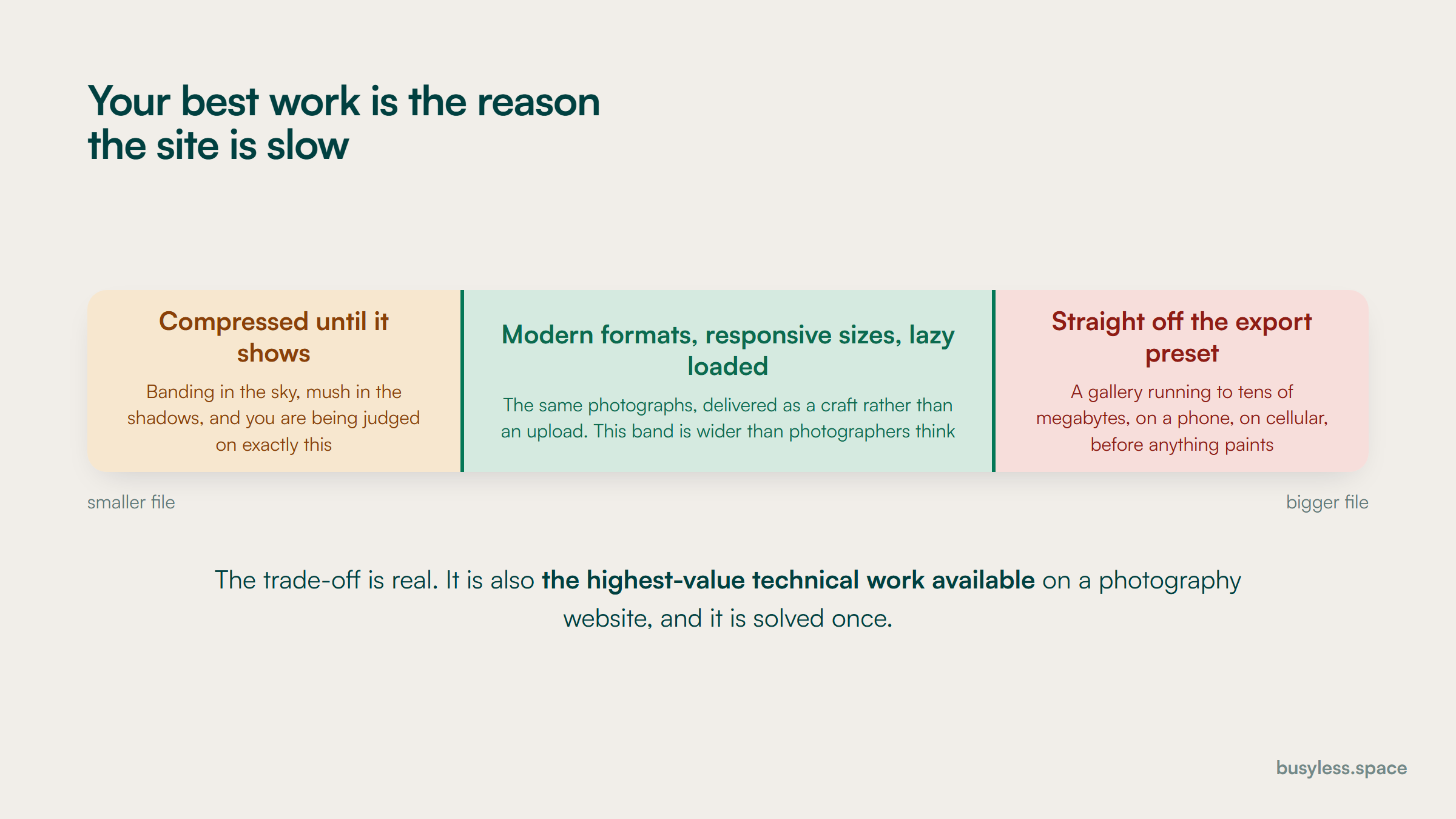
A band with a different failure at each end. Compressed until it shows means banding and mush in work you are being judged on. Straight off the export preset means a gallery of tens of megabytes on a phone. The middle band is modern formats, responsive sizes and lazy loading.
The trade-off is real, the middle band is wider than photographers think, and it is solved once.

Structured data that applies here

The types below fit this industry specifically. Most of them earn no rich result on their own, which is worth knowing before anyone sells the work on that basis. What they do is describe the entity precisely, which matters for how search engines and answer engines resolve who you are.

  • ProfessionalService

    Home page

    Schema.org has no photographer type, so use ProfessionalService with a clear description and a real service area. If you work from a studio with public hours, add those; if you travel, say so with areaServed rather than inventing an address.

    ProfessionalService.jsonld
    {
      "@context": "https://schema.org",
      "@type": "ProfessionalService",
      "@id": "https://[YOUR-DOMAIN]/#business",
      "name": "[BUSINESS NAME]",
      "url": "https://[YOUR-DOMAIN]",
      "telephone": "[+1-555-000-0000]",
      "image": "https://[YOUR-DOMAIN]/studio.jpg",
      "priceRange": "[$$$]",
      "description": "[What you photograph, where, and in what style. One plain sentence.]",
      "areaServed": [
        { "@type": "City", "name": "[CITY]" },
        { "@type": "AdministrativeArea", "name": "[REGION]" }
      ],
      "founder": { "@id": "https://[YOUR-DOMAIN]/about#person" },
      "makesOffer": [
        { "@type": "Offer", "itemOffered": { "@type": "Service", "name": "[Wedding photography]" } },
        { "@type": "Offer", "itemOffered": { "@type": "Service", "name": "[Portrait sessions]" } }
      ]
    }
  • ImageObject with licensing

    Portfolio, venue and commercial images

    This markup exists for exactly this industry and almost no photographer uses it. It lets an image carry its creator, its credit, its copyright and a page where a licence can be acquired, which is the difference between an image being taken and an image being licensed.

    ImageObject with licensing.jsonld
    {
      "@context": "https://schema.org",
      "@type": "ImageObject",
      "contentUrl": "https://[YOUR-DOMAIN]/images/[FILE].jpg",
      "url": "https://[YOUR-DOMAIN]/venues/[SLUG]",
      "name": "[Short descriptive title]",
      "caption": "[What the photograph shows: who, where, what is happening.]",
      "creator": {
        "@type": "Person",
        "name": "[YOUR NAME]",
        "url": "https://[YOUR-DOMAIN]/about"
      },
      "creditText": "[YOUR NAME] / [BUSINESS NAME]",
      "copyrightNotice": "(c) [YEAR] [YOUR NAME]",
      "license": "https://[YOUR-DOMAIN]/image-licence",
      "acquireLicensePage": "https://[YOUR-DOMAIN]/licensing",
      "contentLocation": {
        "@type": "Place",
        "name": "[VENUE NAME], [CITY]"
      }
    }
  • Service with package pricing

    Genre and pricing pages

    Only mark up a starting figure you will honour, and make sure the same figure is visible in the copy. A marked-up price the reader cannot find on the page is worse than no markup.

    Service with package pricing.jsonld
    {
      "@context": "https://schema.org",
      "@type": "Service",
      "name": "[Wedding photography]",
      "serviceType": "[Photography]",
      "provider": { "@id": "https://[YOUR-DOMAIN]/#business" },
      "areaServed": { "@type": "AdministrativeArea", "name": "[REGION]" },
      "offers": {
        "@type": "Offer",
        "priceSpecification": {
          "@type": "PriceSpecification",
          "minPrice": "[0000]",
          "maxPrice": "[00000]",
          "priceCurrency": "USD"
        },
        "description": "[What the starting figure includes: hours, coverage, deliverables. And what moves it.]"
      },
      "termsOfService": "https://[YOUR-DOMAIN]/terms"
    }
  • Person

    The about page, referenced from everything you shot

    Clients are hiring a person who will be present for an entire day, so this node matters more here than the business node does. Link it from the portfolio pages so the work and the photographer are connected.

    Person.jsonld
    {
      "@context": "https://schema.org",
      "@type": "Person",
      "@id": "https://[YOUR-DOMAIN]/about#person",
      "name": "[YOUR NAME]",
      "jobTitle": "Photographer",
      "url": "https://[YOUR-DOMAIN]/about",
      "image": "https://[YOUR-DOMAIN]/portrait.jpg",
      "worksFor": { "@id": "https://[YOUR-DOMAIN]/#business" },
      "knowsAbout": ["[Wedding photography]", "[Documentary photography]", "[VENUE OR REGION]"],
      "sameAs": [
        "https://www.instagram.com/[HANDLE]",
        "https://www.pinterest.com/[HANDLE]"
      ]
    }
  • FAQPage

    Pricing, planning and booking pages

    Pricing and the what-happens-if questions earn their place here, since those are the ones photographers most often leave to an email exchange.

    FAQPage.jsonld
    {
      "@context": "https://schema.org",
      "@type": "FAQPage",
      "mainEntity": [
        {
          "@type": "Question",
          "name": "[Question exactly as it appears on the page]",
          "acceptedAnswer": {
            "@type": "Answer",
            "text": "[Answer exactly as it appears. Give the actual starting figure or the actual timeline.]"
          }
        }
      ]
    }
  • BreadcrumbList

    Venue, genre and session-type pages

    Worth doing once venues and genres are a real hierarchy rather than a flat gallery. It tends to reveal that nothing links to the venue pages, which matters more than the markup does.

    BreadcrumbList.jsonld
    {
      "@context": "https://schema.org",
      "@type": "BreadcrumbList",
      "itemListElement": [
        { "@type": "ListItem", "position": 1, "name": "Home",
          "item": "https://[YOUR-DOMAIN]/" },
        { "@type": "ListItem", "position": 2, "name": "[Venues]",
          "item": "https://[YOUR-DOMAIN]/venues" },
        { "@type": "ListItem", "position": 3, "name": "[VENUE NAME]",
          "item": "https://[YOUR-DOMAIN]/venues/[SLUG]" }
      ]
    }

What it costs

Editorial estimates rather than quotes, and the smallest range in this directory for a good reason: most of the work here is writing and image handling that a photographer can do themselves, and the marketplace subscriptions usually cost more than the SEO would.

Do it yourself

$0 to $200
  • Real text on the home page and proper image delivery
  • Venue pages written after each new venue
  • Alt text written properly as you publish
  • Business profile completed, galleries moved onto your own domain
  • Vendor-list requests sent to every venue you have shot at

Who it suits

A solo photographer with a slow month and a willingness to write

Where it stops

It genuinely gets most of the available value. The limits are consistency and the planning cluster, which takes more writing than most photographers will sustain alone.

Lean

$600 to $1,500
  • The technical image-delivery work done properly, once
  • A venue page programme, written to a template after each new venue
  • The planning guides written for you from your own knowledge
  • Pricing, style and session-type pages
  • Structured data, including image licensing markup

Who it suits

A full-time photographer whose enquiry volume depends on the marketplaces and who wants it not to

Where it stops

It will not outrank the marketplaces on genre-plus-city queries and should not try. It works by taking the ground they do not cover.

Studio

$1,500 to $3,000
  • A commercial section built for art buyers and agencies, separately
  • Licensing content and the rights explanations commercial clients look for
  • Publication submission handled properly as a link-building programme
  • Associate and second-shooter pages where you run a team
  • Attribution reconciled against booked dates rather than form fills

Who it suits

Studios with associates, or photographers building a commercial practice alongside consumer work

Where it stops

The consumer marketplaces remain the biggest single channel in wedding work, and this tier reduces dependence on them rather than replacing them.

How to do it with no budget

This is the industry where the free path gets closest to the paid one, because most of the work is writing about jobs you have already done. The order below is roughly the order of return.

  1. 1

    Put text on the home page

    2 hours

    Your website editor

    What you photograph, where, in what style, starting from what. A slideshow with a logo over it gives a search engine nothing at all, and this is a two-hour fix.

  2. 2

    Fix the image delivery

    3 hours

    Your site platform's image settings

    Modern formats, responsive sizes, dimensions set, lazy loading below the fold and not on the first image. It is the highest-value technical work available to a photographer.

  3. 3

    Write one venue page

    2 hours

    Your website editor

    Pick the venue you have shot at most. Photographs, practical notes, light at different times, where things work. Then use it as the template for every venue after it.

  4. 4

    Ask venues to add you to their vendor list

    20 minutes per venue

    Email

    Send the coordinator a gallery they can use, then ask. It is free, it is a real link, and it is the actual booking mechanism in a large part of this market.

  5. 5

    Publish a starting price

    1 hour

    Your website editor

    A starting figure and what moves it. It filters the enquiries that were never going to book, which in this industry is a large share of them.

  6. 6

    Rewrite the alt text on your best fifty images

    2 hours

    Your website editor

    Describe the photograph rather than repeating a keyword. It serves accessibility, it serves image search, and stuffed alt text serves neither.

  7. 7

    Write one planning guide

    3 hours

    Your website editor

    A timeline, a what-to-wear guide, a family group list. The knowledge is already in your head and clients ask for it every week. It reaches people a year before they book.

The tool stack

Jobs first, tools second, and this is a short list on purpose. The binding constraint here is writing time and image handling, not tooling, and an extra script on an image-heavy site costs more than it does elsewhere.

  • Find the venue and planning queries worth writing for

    Google Search Console plus your own enquiry inbox

    Read your last fifty enquiries and note which venues people name and which questions they open with. That is the venue page list and the planning guide list, in an afternoon.

    Free routeBoth free, and the inbox is the better source

  • Check demand across venues and genres

    DataForSEOSEO APIRead the review

    Worth it only if you are covering many venues or several markets. Venue-name volumes are small and the value is in the intent rather than the count, so do not let a low number talk you out of a page.

    Free routeManual checks are adequate for a solo photographer

  • Work out what a booking from search is worth

    SEO Revenue Growth CalculatorFree toolOpen the tool

    Use average booking value including print and album sales, and remember your capacity is finite: a wedding photographer has a countable number of Saturdays, which changes the whole calculation.

    Free routeFree

  • Compare marketplace spend against everything else

    SEO Budget CalculatorFree toolOpen the tool

    Set it against your actual marketplace subscription. For many photographers the honest finding is that a year of directory fees would have funded the entire content programme twice over.

    Free routeFree

  • Generate the image licensing markup

    Schema Markup GeneratorFree toolOpen the tool

    Get the pattern right once and then produce it from your image metadata. The licensing fields are the part almost no photographer uses and the part that most distinguishes a professional image from an unattributed one.

    Free routeFree

  • Run venue, genre and session pages without rebuilding the site each time

    SanityHeadless CMSRead the review

    Venues, genres, sessions and images are related entities: one wedding should appear on its venue page, its genre page and the blog without being uploaded three times. It also handles image transformation well, which matters more here than anywhere else.

    Free routeFree tier is more than adequate

  • Deliver images at the right size for the device

    Your site platform's image pipeline, or a dedicated image CDN

    The single most important technical decision on a photography website. Check what your platform actually serves by loading a gallery page and looking at the transferred bytes, not at the settings screen.

    Free routeMost modern site platforms include this and it is switched off

  • See what assistants recommend for your venues and your style

    LLM visibility trackerOur toolSee the tool

    Couples increasingly ask an assistant for photographers who have shot at a specific venue. The answer is assembled from whoever wrote about the venue, which is the argument for the venue pages in one sentence.

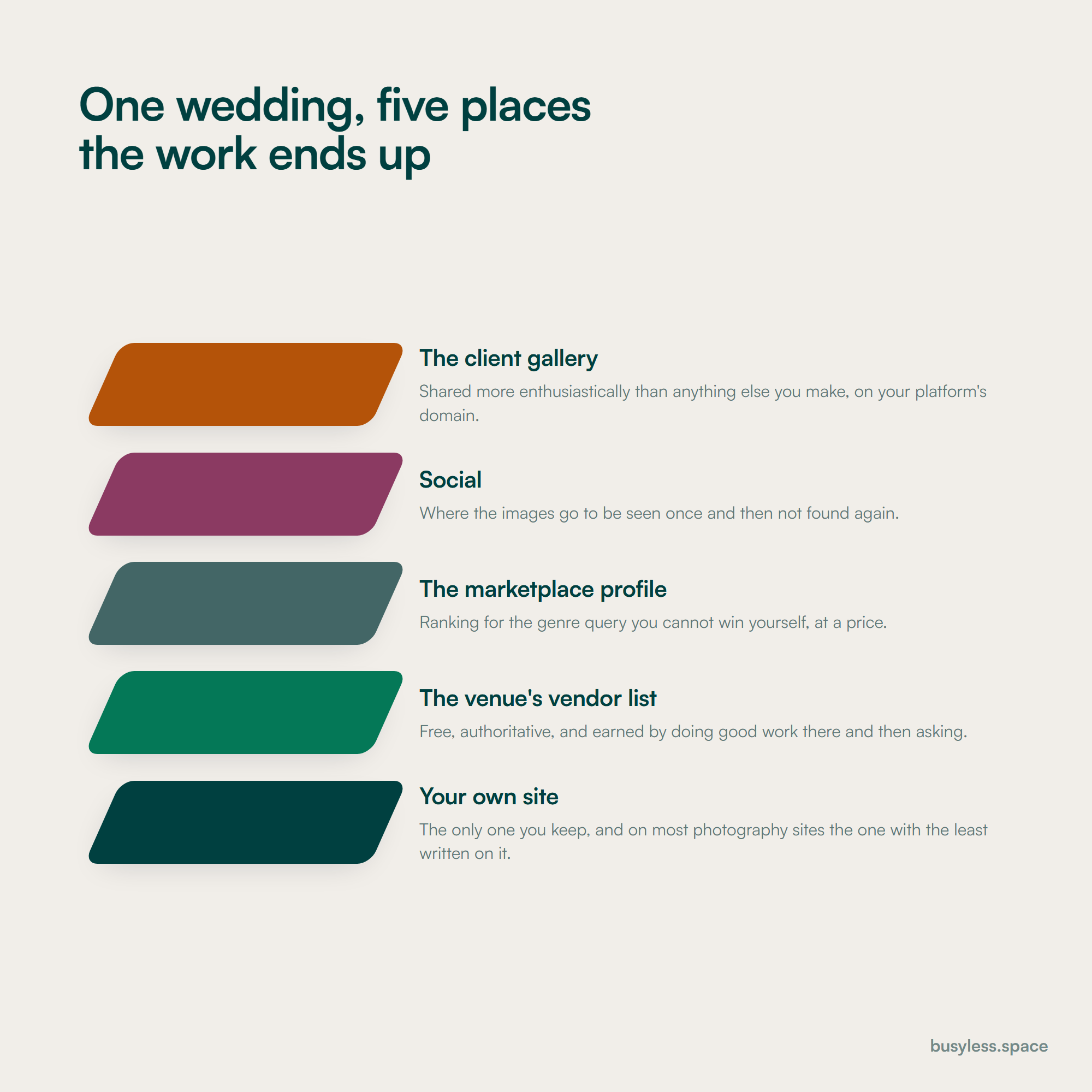
Five stacked plates showing where one wedding ends up: the client gallery on the platform's domain, social, the marketplace profile, the venue's vendor list, and last the photographer's own site.
Four of the five build somebody else's authority. The one you keep is usually the one with the least written on it.

Take it from here

Everything below is yours to take. Fill the [BRACKETS] and it is ready to use. Start with the image delivery audit: everything else on this page is being judged on a page that has to load first.

Checklist

The central technical problem in this industry. Your best work is what makes the site slow, and the fix is delivery craft rather than fewer or smaller photographs.

IMAGE DELIVERY AUDIT - [BUSINESS] - [DATE]

THE TEST, BEFORE ANYTHING ELSE
Open your busiest gallery page on a phone, on cellular data, away
from the office. Time it. That is the experience your enquiries
are having, and it is not the experience you have been testing.
Page tested: [_________________________]
  Time to first image visible: [____] seconds
  Total transferred: [____] MB
  Number of images on the page: [____]

1. WHAT IS ACTUALLY BEING SERVED
   Open the browser network tab and sort by size.
   | Image           | Served size | Displayed at | Format |
   |-----------------|-------------|--------------|--------|
   | [_____________] | [_________] | [__________] | [_____] |
   | [_____________] | [_________] | [__________] | [_____] |
   | [_____________] | [_________] | [__________] | [_____] |

   If served size is much larger than displayed size, the
   platform is not resizing and that is the whole problem.

2. THE FIXES, IN ORDER OF VALUE
   [ ] Modern formats served (AVIF or WebP with a fallback)
   [ ] Responsive sizes generated, browser chooses
   [ ] Width and height set on every image so layout does not jump
   [ ] Everything below the fold lazy-loaded
   [ ] The FIRST image NOT lazy-loaded
       (this is the mistake most often made while fixing the
        others, and it makes the main measurement worse)
   [ ] First image preloaded
   [ ] Quality setting reviewed: most galleries are exported far
       above the point where anybody can see the difference on a
       screen
   [ ] Metadata stripped on export for public images

3. THE QUALITY CONVERSATION, HONESTLY
   Export the same image at your current setting and at a lower
   one. Look at both on a phone. Note the file sizes.
   Current: [____] KB    Lower: [____] KB
     Visible difference on a phone: [ Y / N ]
   Have this argument with yourself once, with evidence, rather
   than defending an export preset you chose years ago.

4. RE-TEST
   Same page, same conditions, after the fixes.
   Time to first image: [____] s   (was [____])
   Total transferred:   [____] MB  (was [____])

5. KEEP IT FIXED
   [ ] Export preset saved and used by everyone
   [ ] Anybody uploading knows the maximum dimensions
   [ ] Re-test after any site redesign, because redesigns
       reintroduce this every single time

What to publish

Closest to a booking decision first. Photographers publish more galleries; the enquiries come from the writing around them, which is the part that gets skipped.

  • Venue pages

    One after every new venue, forever

    The most qualified query in the industry, the lowest competition, and the only content that can win it is photographs you already own.

  • Full event stories rather than gallery dumps

    One or two a month, from work you have already delivered

    Same images, an actual page. The story gives the photographs context, matches planning queries, and is the difference between a portfolio and an asset.

  • Planning guides

    One a month until the obvious ones are covered

    Reaches people a year before they book, uses knowledge you already have, and it is the cluster where a photographer's practical experience is worth most and published least.

  • A pricing page with a real starting figure

    Once, reviewed before every season

    Searched constantly, answered by aggregators, and it saves hours of enquiry handling every month by filtering out people who were never going to book.

  • Style pages that show rather than assert

    One per style you genuinely shoot

    Highly qualifying. Somebody searching a style already knows what they want, and showing what the term means in your work converts far better than claiming it.

  • A commercial section with licensing explained

    Once, properly, if you want that work

    Different buyer, much larger budgets, and the licensing question is the one they search and nobody answers.

And what not to

  • Gallery posts with two lines of introduction and eighty images
  • Alt text that repeats the same keyword phrase across a whole page
  • Portfolio work you cannot evidence the rights to, particularly second-shooter frames
  • Images of clients, and especially of minors, published without documented permission
  • Discounts or upgrades offered in exchange for a review
  • Print-resolution files uploaded straight to the website
  • A page for every town in the region, which is a doorway pattern with photographs attached

The expensive mistakes

Treating the website as a portfolio rather than a site

Costs you A beautiful set of pages with nothing on them a search engine can understand, and total dependence on the marketplaces

Keep the images and add the writing: venues, planning, pricing, style, and the story behind each event

Uploading print-resolution files

Costs you A gallery page of tens of megabytes, viewed on a phone, by somebody who leaves before the first image renders

Modern formats, responsive sizes, dimensions set, and the first image loaded eagerly rather than lazily

Never asking venues for the vendor list

Costs you The most valuable free listing in the industry, unclaimed, while you pay a marketplace for worse placement

Send the coordinator a gallery after every wedding, then ask. It takes twenty minutes and it compounds

Refusing to publish a starting price

Costs you Hours of enquiry handling every month with people who were never going to book, and an aggregator answering the query instead

A starting figure and what moves it, which qualifies enquiries before they arrive

Publishing second-shooter work without an agreement

Costs you A portfolio that may not be yours to publish, discovered at the worst possible moment

A written agreement with every second shooter and associate, in place before the shoot

Measuring sessions rather than dates

Costs you A number with no relationship to a finite calendar, in a business where capacity is countable Saturdays

Enquiries and booked dates by source and genre, against the capacity you actually have

What to measure

Photography has an unusual measurement shape: very long consideration windows, very small transaction counts, and a hard capacity ceiling. That combination makes monthly reporting misleading and makes asking the enquirer directly the most reliable data you have.

Leading indicators

Move first. They predict, they do not prove.

  • Impressions on venue and planning queries

    Search Console, filtered by cluster

    The right leading indicator, because it measures the ground you can actually win rather than the genre queries the marketplaces own.

  • Image search impressions and clicks

    Search Console, image search report

    A channel that genuinely matters here and is invisible in a default report. It also tells you whether the alt text and image delivery work is doing anything.

  • Venue pages published, and vendor lists secured

    Your own count

    Two numbers worth reporting as activity, because both compound and both are entirely within your control regardless of what any algorithm does.

  • Profile actions and marketplace profile views

    Business profile insights and the marketplace dashboard

    Track the marketplace number specifically to price the subscription, not to celebrate it. A profile view is a long way from a booked date.

Business indicators

The ones a manager acts on.

  • Enquiries by source and genre

    One question on the enquiry form, asked the same way every time

    The most reliable data in this industry, because consideration windows are far too long for analytics to hold the thread.

  • Booked dates

    Your calendar

    The actual business number. Report it against available capacity, because in wedding work the ceiling is a countable number of Saturdays and a full season means stop spending.

  • Average booking value, including sales after the event

    Your own records

    Prints, albums and reorders can be a meaningful share of the value and they arrive months later. A booking figure that ignores them undervalues every channel equally.

  • Cost per booked date by channel

    Booking records plus channel spend

    The comparison that decides whether the marketplace subscriptions get renewed. Include the enquiry-handling time each channel costs you, because it differs sharply.

The verdict

Photography is the industry where the technical work and the creative work pull hardest against each other, and where resolving that is worth more than any keyword decision. Fix image delivery first, because everything else is being judged on a page nobody waited for.

After that, the opportunity is unusually concrete. Venue pages, real event stories and planning guides are all built from work you have already done and knowledge you already have, and almost nobody in your market has published any of it.

There is a fast way to test anybody selling photography SEO services, and it is three questions long. Will they fix image delivery before writing anything? Will they build a venue page programme? Will they measure booked dates against your actual capacity rather than sessions?

The first is the one that gets skipped, because image pipelines are a developer problem and blog posts are not. Before agreeing to SEO services for photographers I would ask them to load your busiest gallery page on a phone, in front of you.

FAQ

Photography SEO questions

  • Why is our website slow when the design is so simple?
    Because the images are the design. Photographers export at print quality and upload without resizing, so a gallery page can run to tens of megabytes on a phone. The fix is not fewer or smaller pictures, it is delivery: modern formats, responsive sizes, dimensions set so the layout does not jump, and lazy loading everything except the first image. That last exception is the mistake most people make while fixing the others.
  • Can we compete with the wedding marketplaces?
    Not on genre-plus-city queries, and you do not need to. Those pages are effectively paid placement and they list forty of your competitors beside you. What the marketplaces do not cover is venue names, planning questions, style terms and session types, and those are searched by people who have already decided to book somebody. That is where the available ground is.
  • What is the single best page we could add?
    A page for the venue you have shot at most. Somebody searching a venue name has already booked the venue, competition is low, and the only content that can win the query is photographs taken there, which you already have. Add the practical knowledge nobody else has: the light at different times, where the ceremony works, what the rain plan actually looks like. Then send it to the venue coordinator.
  • Should we publish prices?
    A starting figure and what moves it, yes. The objection is that a number invites a comparison you will lose, but the alternative is spending hours a month on enquiries from people whose budget was never close. Add the honest paragraph most photographers will not write: if your budget is under this figure, I am probably not the right fit, and here is who I would suggest instead.
  • Do we own the photographs our second shooter took?
    Probably not, unless you have it in writing. Copyright generally belongs to the person who took the photograph, and loose or verbal arrangements with second shooters are normal in this industry. That means portfolio work can turn out not to be yours to publish, usually discovered at the worst moment. Get a written agreement with every second shooter and associate before the shoot, and audit what is already published against the agreements you actually hold.
  • Is Pinterest worth the effort?
    Treat it as a search engine rather than as social media, because that is how it is used here. It ranks in general search results for inspiration and planning terms, pins have a long life, and the unit of content is an image. It rewards consistency and good titles more than volume, and it works best pointing at real pages on your own site rather than at a gallery.
  • What does photography SEO cost?
    The tiers above are editorial estimates rather than quotes, and this is the smallest range in the directory. Most of the highest-value work is writing about jobs you have already done, which a photographer can do alone in an off season. Paying for help is realistically $600 to $3,000 a month. Before spending anything, compare it against your marketplace subscriptions, because a year of directory fees often would have funded the whole content programme twice.
  • Can AI write our blog posts?
    For structure and editing, yes. For the content that actually works here, no, because that content is your specific experience: what the light did at that venue, how the timeline ran, what went wrong and how you handled it. A model cannot produce any of it. Use it to organise your notes into a draft, then write the parts only somebody who was there could write.

Run it yourself, or have someone own it

Everything above is written to be run without us, and the free path is genuinely most of the value for a single-location business. Where these plans stall is almost never the plan. It is that nobody owns it after the first month. That is the job we do, with search as one distribution layer inside a wider system rather than the whole engagement.