


Skip to content

Staffing SEO strategy

Regulated marketing

Job boards own the candidate side, so the money is on the other one

Written by Eugene SuslovLast reviewed 29 August 2026No affiliate links
Sector
Business services
Model
National service, Marketplace
Competition
High
Time to results
6 to 12 months
Typical monthly
$2,000 to $9,000

Key takeaways

  1. 1Stop competing for candidates on search. Indeed, LinkedIn and ZipRecruiter own that half and always will. Your candidate supply comes from the job boards, referrals and your own database, not from ranking.
  2. 2The employer barely searches, and that changes the target. A hiring manager runs two or three queries and then asks a peer, so the job is to be findable at the moment of the query and credible in the conversation afterwards.
  3. 3Your biggest content asset is probably invisible. Most staffing sites render vacancies inside an ATS iframe, so hundreds of pages of genuine content contribute nothing and carry no JobPosting markup.
  4. 4This is one of only two categories where Google's Indexing API is legitimate. Job postings expire, and getting them crawled quickly and removed cleanly is a real advantage almost nobody in the industry uses.
  5. 5A regulator can make you publish a page. New York City requires an employer using an automated hiring tool to put a bias audit summary on its own website, which is a compliance obligation discharged as a URL.

SEO for staffing agencies has to begin by conceding half the market. Candidate search belongs to Indeed, LinkedIn and ZipRecruiter, and an agency that spends its budget competing there is buying second place in somebody else's category.

That concession is less painful than it sounds, because the candidate side is not where the margin is. The employer pays, and the employer is reachable in a way the aggregators have never bothered to serve well.

So a staffing SEO strategy is really an employer-side content strategy wearing a two-sided business's clothes. What does it cost, how does the markup work, what is co-employment risk, how long does this role take to fill in this market.

The difficulty is that the employer searches rarely. A hiring manager with an open role runs two or three queries, shortlists from what comes back and from who a colleague recommends, and then does not search again for a year.

That makes this a low-volume, high-value category where a handful of pages carry almost everything, and where being absent from one query is more expensive than being tenth on twenty others.

Underneath all of it sits a compliance layer that has grown quickly. Pay transparency statutes now regulate the contents of a job posting in most large states, and one city requires an employer to publish an audit of its hiring software on its own site.

Who already ranks in staffing and recruiting

Search a role plus your city and then search staffing agency plus your city, and notice they return two different internets. Almost every staffing SEO audit finds the firm invisible on the first, which is correct and unavoidable, and absent from the second, which is neither.

What is on the results page

  • Google for Jobs occupying the top of every candidate query
  • Job boards holding the entire first page on role and location terms
  • Review and rankings directories on agency and service terms
  • Local pack on staffing agency near me, above independent firms
  • People Also Ask, dense on cost, markup and how agencies work
  • LinkedIn company and people results on agency brand queries
  • Very thin competition on employer-side cost and process questions
  • Indeed

    indeed.comClaim it

    Owns candidate search and is not a competitor you can outrank. Treat it as supply infrastructure you pay for, and measure it on cost per placed candidate rather than on applications. The strategic question is not how to beat it, it is how little you can depend on it.

  • LinkedIn

    linkedin.comClaim it

    Ranks on your own brand and on your recruiters' names, so it is the first thing an employer checks after finding you. The company page and the consultants' profiles are effectively part of your website, and they are usually the least maintained part.

  • Google for Jobs

    google.com

    Not a site you can claim, but an aggregator that will surface your vacancies directly if they carry valid JobPosting markup on a crawlable page. Most agencies are locked out of it by their own ATS, which is a solvable technical problem rather than a competitive one.

  • Clutch

    clutch.coClaim it

    The employer-side directory that matters most, because it ranks on staffing and recruiting plus a city and it is built for a buyer comparing firms. A profile with verified client reviews does work here that your own testimonials page cannot.

  • ClearlyRated

    clearlyrated.comClaim it

    Specific to this industry and taken seriously inside it, because the ratings come from surveyed clients and placed talent rather than from anyone who walks past. Worth more than a general review platform to a buyer who knows the category.

  • G2

    g2.comClaim it

    Relevant if you sell anything that looks like a product, such as managed services or a workforce platform. Less relevant for pure contingent search, where the buyer is not shopping in a software category.

  • Google Business Profile

    google.comClaim it

    Worth claiming per branch if you genuinely have staffed offices, because staffing agency near me still returns a local pack. Do not create profiles for addresses nobody works from; this is exactly the category where that gets reported.

A pyramid of dependence with placements at the narrow top, resting on recruiter capacity, then your own database, then the job boards you rent candidate supply from
Marketing can only widen the top band. Everything holding it up is either rented from an aggregator or already at capacity.

What people actually search

Almost every cluster below is an employer cluster, which is the whole argument of this page. The two candidate clusters are here to be understood rather than pursued, because one of them is unwinnable and the other one is about you.

Employer, specialism and place

Commercial, local, high value

manufacturing staffing agency in [city]

The page that wins it: A page per specialism per market, with real placement detail

The single most valuable cluster in the category and the one most agency sites answer with a generic services page. Volume is low and the value per visit is very high, which inverts the usual content maths.

Employer, cost and markup

Commercial investigation, price-led

staffing agency markup rates

The page that wins it: A pricing explainer covering markup, bill rate and conversion fees

The question every buyer has and almost no agency answers publicly, because the industry treats rates as negotiable. Explaining how the model works, without publishing your own margins, wins the buyer who is trying to build a business case.

Employer, agency versus alternative

Commercial investigation, comparison

recruiting agency vs in-house recruiter cost

The page that wins it: An honest comparison including when not to use an agency

The comparison the buyer is already making internally. Saying plainly when hiring directly is cheaper is what makes the rest of the page credible, and it filters out the enquiries that were never going to close.

Employer, compliance and risk

Informational, risk-led

co-employment risk with temp workers

The page that wins it: Explainers on co-employment, classification and pay transparency

Attracts a more senior reader than any other cluster here, usually somebody in HR or legal who can stop a deal. Being the firm that explained the risk clearly is worth more than being the cheapest quote.

Employer, urgency and season

Commercial, deadline-driven

temp staffing for peak season

The page that wins it: Seasonal ramp pages published a quarter ahead of the season

Predictable and repeatedly under-served. The buyer is planning in advance for once, which makes this the rare staffing query with a research phase you can occupy.

Employer, salary and market data

Informational, planning

what does a [role] pay in [city]

The page that wins it: Salary guides by role and market, dated and sourced

The classic staffing content asset and still the best one, because you genuinely hold the data. It also feeds the pay transparency problem: an employer writing a compliant posting needs a defensible range.

Candidate, job search

Transactional, candidate

warehouse jobs near me

The page that wins it: Vacancy pages, crawlable, with JobPosting markup

Do not build a strategy here. Publish the vacancies properly so Google for Jobs can surface them, and let the boards do the rest. Expecting to outrank Indeed on this is how staffing budgets get wasted.

Candidate, is this agency any good

Navigational, trust-checking

[agency name] reviews

The page that wins it: A candidate FAQ, plus claimed and current review profiles

Low volume and disproportionately damaging when unanswered, because a candidate who backs out at offer stage costs a placement. This is reputation management rather than acquisition.

A quadrant plotting search volume against value per visit, placing candidate job searches at high volume and low value and employer specialism queries at low volume and high value
The two halves of this business sit in opposite corners, which is why a single traffic total tells you nothing useful about it.

What the rules change

Three regulators reach the asset this industry publishes most: the job posting itself. That is what moved this entry from standard to regulated once it was researched. This is my reading rather than legal advice, and employment law here changes fast.

1

An automated hiring tool obliges you to publish an audit on your website

NYC Local Law 144, effective 1 January 2023, enforced by DCWP from 5 July 2023

What it means

An employer or employment agency using an automated employment decision tool on a candidate in New York City must commission an independent bias audit annually, publish a summary of the most recent audit on its website, and notify candidates at least ten business days in advance.

So do this

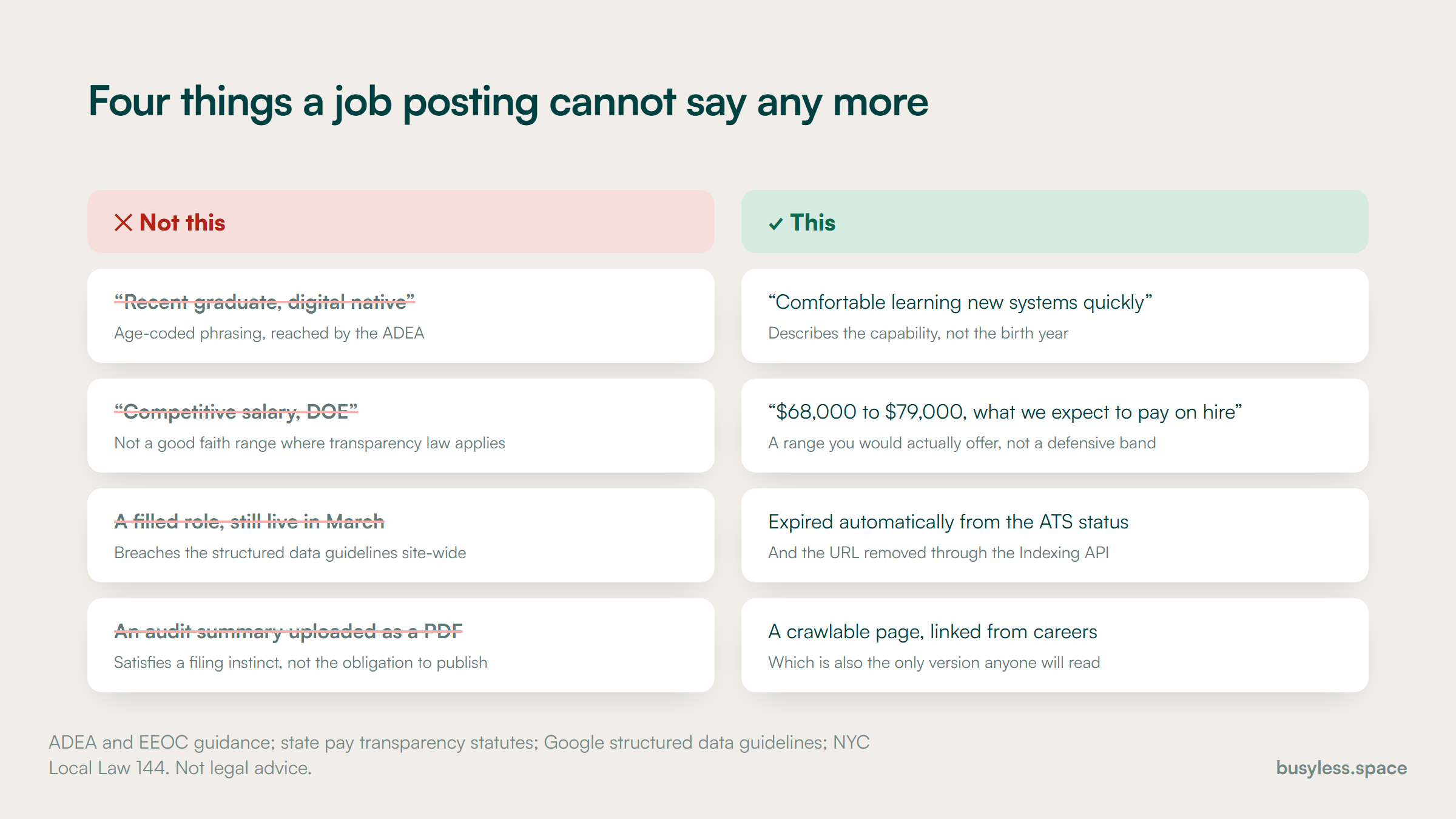
Publish the summary as a real, crawlable page rather than a PDF nobody can read, and link it from the careers section. This is a compliance obligation that produces a URL, which is unusual enough to be worth doing well.

2

Pay transparency statutes regulate the contents of a posting

Colorado effective 1 January 2021; Illinois January 2025; California SB 642, signed 8 October 2025, effective 1 January 2026

What it means

Several states require a good faith pay range in the posting itself. California's SB 642 narrowed pay scale to the range the employer reasonably expects to pay upon hire, which was aimed at meaninglessly wide compliance ranges.

So do this

Assume the strictest applicable rule, because a remote posting is generally reached by every state the work could be performed in. Build the range into the posting template rather than leaving it to whoever publishes the role.

3

Job advert wording is reached by discrimination law

EEOC guidance under Title VII, the ADEA and the ADA

What it means

Advertisements indicating a preference based on a protected characteristic are unlawful, and age-coded phrasing such as recent graduate or digital native is a common route into that problem.

So do this

Keep a banned-phrase list in the posting template and check it before publication. An agency publishes far more adverts than any single employer, so a bad habit here scales faster than anywhere else.

4

A stale vacancy is a structured data policy problem

Google Search structured data guidelines for job postings

What it means

JobPosting markup must describe a genuine, currently open role on a page a candidate can read. Leaving filled roles live, or publishing duplicate postings to inflate coverage, breaches the guidelines and can cost the whole site its job eligibility.

So do this

Expire postings automatically when the role closes and remove the URL properly. This is the one place where a tidy content process is directly load-bearing for visibility.

Four pairs contrasting what a job posting must not say against what the compliant version says instead
An agency publishes more adverts than any single employer, so a habit on the left scales faster here than anywhere else.

Proving expertise

The buyer here is spending real money on an intangible outcome, so the signals that matter are the ones that survive a reference call. Almost none of them are on a typical staffing website.

  • Named consultants with the sectors they actually recruit into
  • Time to fill and fill rate by specialism, stated honestly and dated
  • Client case studies naming the role, the market and the constraint
  • Verified client reviews on Clutch or ClearlyRated, not testimonials you typed
  • Salary data from your own placements, with the sample described
  • Certifications and industry association membership, linked
  • The bias audit summary, published rather than filed
  • Clear terms: guarantee periods, conversion fees, replacement policy

How to build a staffing SEO strategy

The first phase below is technical rather than editorial, because on most staffing sites the largest content asset is currently invisible. A staffing SEO strategy that starts by writing employer content while several hundred vacancies sit inside an iframe is leaving the cheapest win on the table.

  1. 1

    Weeks 1-4

    Make the vacancies real pages

    • Establish whether the ATS renders jobs on your domain or in an iframe
    • Move vacancies onto crawlable URLs, one role per page
    • Add valid JobPosting markup with the five required fields
    • Set up automatic expiry and proper removal for filled roles
    • Submit job URLs through the Indexing API

    You end up with
    Every open role indexable, eligible for Google for Jobs, and expiring cleanly

  2. 2

    Weeks 5-9

    Build the employer side

    • Write the specialism pages, one per discipline you genuinely serve
    • Write the pricing explainer covering markup and conversion fees
    • Write the agency versus in-house comparison, honestly
    • Publish the compliance explainers on co-employment and classification
    • Claim and complete Clutch and ClearlyRated

    You end up with
    A site that answers the four questions an employer actually has

  3. 3

    Weeks 10-14

    Publish what only you know

    • Build the salary guide from your own placement data, dated and described
    • Add market pages for the cities where you have staffed offices
    • Publish the bias audit summary as a crawlable page if it applies
    • Add consultant profiles with real specialisms
    • Ask clients for verified reviews on the directories that matter

    You end up with
    Proprietary data and proof that a competitor cannot copy from a template

  4. 4

    Weeks 15-18

    Connect it to revenue

    • Split enquiry tracking between employer and candidate
    • Join employer enquiries to placements in the CRM
    • Report cost per placement alongside cost per enquiry
    • Review job board spend against placements rather than applications
    • Set the salary guide refresh on a recurring date

    You end up with
    A report that talks about placements rather than about sessions

Technical fixes with the best payoff

Two defects dominate this category and both come from the same place: the applicant tracking system was chosen for recruiters and the website was an afterthought. Between them they usually account for more lost visibility than every content decision combined.

  • Vacancies render inside an ATS iframe

    A project, not a task

    Almost every applicant tracking system offers a drop-in careers widget, and it is the fastest way to launch. The result is that the largest body of unique content the business produces sits on somebody else's domain, inside a frame, invisible.

    Render jobs server-side on your own URLs, one per role, using the ATS API rather than its widget. This is the single largest technical gain available in the category.

  • Filled roles stay live for months

    A day, then automatic

    Expiry is a manual step nobody owns, and a recruiter who has filled a role has no reason to log back in and close it.

    Expire automatically from the ATS status, return the right response for removed roles, and use the Indexing API removal endpoint. Stale postings breach the structured data guidelines and can cost eligibility site-wide.

  • The Indexing API is sitting unused

    A day of developer time

    Most agencies have never heard of it, and most guides do not mention it because it applies to almost nothing. Job postings are one of the two legitimate use cases.

    Wire it into the publish and close events in the ATS. Roles get crawled in hours rather than days, which matters when the average vacancy is open for weeks.

  • There are no employer pages at all

    A week to structure, then ongoing

    The site was built as a job board because that is what the business looks like from the inside, so the paying customer has nothing to read.

    Add an employer section with its own navigation, its own conversion and its own internal linking. Treat it as a separate site that happens to share a domain.

  • A location page for every branch, all identical

    A day, then a page a week

    Multi-market agencies generate them from a template, which produces near-duplicate pages that compete with each other and rank for nothing.

    Keep a page only where you have a staffed office, and fill it with that market's roles, salaries and consultants. Delete the rest and redirect them.

  • The bias audit summary is an uncrawlable PDF

    An hour

    Compliance produced a document and somebody uploaded it, which satisfies a lawyer and nothing else.

    Publish it as a page, in HTML, linked from the careers section. It is a transparency obligation and a trust asset at the same time.

Structured data that applies here

The types below fit this industry specifically. Most of them earn no rich result on their own, which is worth knowing before anyone sells the work on that basis. What they do is describe the entity precisely, which matters for how search engines and answer engines resolve who you are.

  • JobPosting

    Every individual vacancy page

    This site deliberately never emits JobPosting on its own hiring guides, because those are editorial rather than open roles. Here it is the opposite: the vacancies are real, and this markup is what makes them eligible for Google for Jobs.

    JobPosting.jsonld
    {
      "@context": "https://schema.org",
      "@type": "JobPosting",
      "title": "[ROLE TITLE, WITHOUT THE AGENCY NAME]",
      "description": "[FULL HTML DESCRIPTION OF THE ROLE, AS THE CANDIDATE READS IT]",
      "datePosted": "[YYYY-MM-DD]",
      "validThrough": "[YYYY-MM-DD]",
      "employmentType": "[CONTRACTOR / TEMPORARY / FULL_TIME]",
      "hiringOrganization": {
        "@type": "Organization",
        "name": "[CLIENT NAME, OR YOUR AGENCY IF THE CLIENT IS CONFIDENTIAL]",
        "sameAs": "https://[CLIENT-DOMAIN]/"
      },
      "jobLocation": {
        "@type": "Place",
        "address": {
          "@type": "PostalAddress",
          "streetAddress": "[STREET]",
          "addressLocality": "[CITY]",
          "addressRegion": "[STATE]",
          "postalCode": "[ZIP]",
          "addressCountry": "US"
        }
      },
      "baseSalary": {
        "@type": "MonetaryAmount",
        "currency": "USD",
        "value": {
          "@type": "QuantitativeValue",
          "minValue": "[MIN]",
          "maxValue": "[MAX]",
          "unitText": "[HOUR / YEAR]"
        }
      }
    }
  • JobPosting for a fully remote role

    Remote vacancy pages

    A remote role has no street address, and supplying a fake one is the most common way agencies break this markup. The correct construction uses jobLocationType with applicantLocationRequirements, and it also interacts with pay transparency law.

    JobPosting for a fully remote role.jsonld
    {
      "@context": "https://schema.org",
      "@type": "JobPosting",
      "title": "[ROLE TITLE]",
      "description": "[FULL HTML DESCRIPTION]",
      "datePosted": "[YYYY-MM-DD]",
      "validThrough": "[YYYY-MM-DD]",
      "employmentType": "FULL_TIME",
      "jobLocationType": "TELECOMMUTE",
      "applicantLocationRequirements": {
        "@type": "Country",
        "name": "USA"
      },
      "hiringOrganization": {
        "@type": "Organization",
        "name": "[CLIENT OR AGENCY NAME]"
      },
      "baseSalary": {
        "@type": "MonetaryAmount",
        "currency": "USD",
        "value": {
          "@type": "QuantitativeValue",
          "minValue": "[MIN]",
          "maxValue": "[MAX]",
          "unitText": "YEAR"
        }
      }
    }
  • EmploymentAgency

    Home page and each staffed office page

    schema.org has a dedicated type for this business, which is more precise than the LocalBusiness most agency sites emit and which correctly separates the firm from the roles it advertises.

    EmploymentAgency.jsonld
    {
      "@context": "https://schema.org",
      "@type": "EmploymentAgency",
      "name": "[AGENCY NAME]",
      "url": "https://[YOUR-DOMAIN]/",
      "telephone": "[+1-555-000-0000]",
      "address": {
        "@type": "PostalAddress",
        "streetAddress": "[STREET]",
        "addressLocality": "[CITY]",
        "addressRegion": "[STATE]",
        "postalCode": "[ZIP]",
        "addressCountry": "US"
      },
      "areaServed": [
        { "@type": "AdministrativeArea", "name": "[METRO OR STATE]" }
      ],
      "knowsAbout": [
        "[SPECIALISM]",
        "[SPECIALISM]",
        "[SPECIALISM]"
      ],
      "numberOfEmployees": {
        "@type": "QuantitativeValue",
        "value": "[N]"
      }
    }
  • Service for each specialism

    Each specialism and market page

    The employer-side pages are the ones that carry the revenue and they need their own markup, separate from the vacancies. This is what stops the whole site reading to a search engine as a job board.

    Service for each specialism.jsonld
    {
      "@context": "https://schema.org",
      "@type": "Service",
      "serviceType": "[Contract manufacturing staffing]",
      "provider": {
        "@type": "EmploymentAgency",
        "name": "[AGENCY NAME]",
        "url": "https://[YOUR-DOMAIN]/"
      },
      "areaServed": { "@type": "City", "name": "[CITY]" },
      "audience": {
        "@type": "BusinessAudience",
        "audienceType": "[Operations and plant leadership]"
      },
      "hasOfferCatalog": {
        "@type": "OfferCatalog",
        "name": "[Staffing services]",
        "itemListElement": [
          { "@type": "Offer", "itemOffered": { "@type": "Service", "name": "[Temporary staffing]" } },
          { "@type": "Offer", "itemOffered": { "@type": "Service", "name": "[Temp to hire]" } },
          { "@type": "Offer", "itemOffered": { "@type": "Service", "name": "[Direct placement]" } }
        ]
      }
    }
  • Dataset for the salary guide

    The salary guide landing page

    Unusual, and appropriate here because a salary guide built from your own placements genuinely is a dataset. It also forces you to describe the sample and the period, which is exactly the discipline that makes the guide trustworthy.

    Dataset for the salary guide.jsonld
    {
      "@context": "https://schema.org",
      "@type": "Dataset",
      "name": "[YEAR] salary guide: [SPECIALISM] in [MARKET]",
      "description": "[Compensation ranges drawn from N placements made between DATE and DATE across MARKETS.]",
      "creator": {
        "@type": "EmploymentAgency",
        "name": "[AGENCY NAME]",
        "url": "https://[YOUR-DOMAIN]/"
      },
      "temporalCoverage": "[YYYY-MM/YYYY-MM]",
      "spatialCoverage": {
        "@type": "Place",
        "name": "[MARKET]"
      },
      "variableMeasured": "[Base salary range by role and seniority]",
      "license": "https://[YOUR-DOMAIN]/terms"
    }
  • FAQPage

    The pricing explainer and the compliance pages

    Mark up the questions a buyer actually asks before the first call: how the markup works, what happens if the placement does not work out, and who is the employer of record. Those decide the meeting more than any ranking does.

    FAQPage.jsonld
    {
      "@context": "https://schema.org",
      "@type": "FAQPage",
      "mainEntity": [
        {
          "@type": "Question",
          "name": "[How does staffing agency markup work?]",
          "acceptedAnswer": {
            "@type": "Answer",
            "text": "[The bill rate is the pay rate plus a markup covering employer taxes, insurance, our margin and NAMED ITEMS. Here is how each part moves.]"
          }
        },
        {
          "@type": "Question",
          "name": "[What happens if the placement does not work out?]",
          "acceptedAnswer": {
            "@type": "Answer",
            "text": "[Our guarantee period is N days. Here is exactly what we do and what it costs you, stated before you sign rather than after.]"
          }
        }
      ]
    }

What it costs

These bands are editorial estimates of the work rather than a price list or survey data. Staffing sits higher than most service categories here for a structural reason: the first phase is usually a development project to get vacancies out of an iframe, and that is spent before any content exists.

Lean

$2,000 to $4,000
  • Vacancies on crawlable URLs with valid JobPosting markup
  • Automatic expiry and clean removal of filled roles
  • Four or five employer-side pages: specialisms, pricing, comparison
  • Clutch and ClearlyRated profiles completed
  • Employer and candidate enquiries tracked separately

Who it suits

A single-market agency with one or two specialisms, where the owner or a director can answer the employer questions in an interview.

Where it stops

The salary guide needs data work and a refresh commitment, and without it the strongest proprietary asset in the category stays unbuilt.

Funded

$4,000 to $9,000
  • Everything above, plus the salary guide built from placement data
  • A page per specialism per market, with genuine local content
  • Compliance explainers written with someone who knows the law
  • Consultant profiles and client case studies produced properly
  • Reporting joined to placements in the CRM rather than to sessions

Who it suits

Multi-market or multi-specialism firms where a single additional placement a month more than covers the spend.

Where it stops

Beyond this the constraint is recruiter capacity and candidate supply, and marketing that outruns delivery costs you the client relationship you just won.

How to do it with no budget

Less of this playbook is free than in most categories, because the first fix is a development job. What is free is everything that follows from data you already hold in the applicant tracking system.

  1. 1

    Find out whether your jobs are actually indexable

    10 minutes

    View source on a vacancy page

    If the role text is not in the HTML, it is in an iframe and none of it counts. This ten minute check decides the whole plan, and most agencies have never run it.

  2. 2

    Close the filled roles

    An hour, then a weekly habit

    Your ATS

    Stale vacancies breach the structured data guidelines and waste crawl budget on pages nobody can apply to. Until expiry is automatic, do it manually every Friday.

  3. 3

    Write the pricing explainer

    3 hours

    Your website editor

    Explain how markup, bill rate and conversion fees work without publishing your own margins. It is the question every buyer has and almost nobody in the industry answers in public.

  4. 4

    Pull a salary range from your own placements

    A day

    Your ATS reporting

    Even one specialism in one market is a genuine dataset nobody else has. Describe the sample and the period honestly and it will outperform any borrowed industry report.

  5. 5

    Claim Clutch and ClearlyRated

    2 hours, plus review chasing

    Those platforms

    The employer-side directories rank on agency plus city, which is the query your buyer runs. A complete profile with verified reviews does work your own testimonials page cannot.

  6. 6

    Fix the consultant profiles

    2 hours

    LinkedIn

    A buyer checks the recruiter before the agency. Those profiles rank on your brand and are effectively part of your site, and they are usually years out of date.

  7. 7

    Split employer and candidate conversions in analytics

    An hour

    Google Analytics

    Two events, not one. Until they are separate every report flatters the half of the business that costs money, and no decision about budget can be made honestly. It is the cheapest change here with the largest effect on what gets decided.

The tool stack

Short, and pointed at the two things this category cannot see from the inside: how much of your traffic is candidates rather than buyers, and whether you have the recruiters to deliver what marketing is selling.

  • See how much demand is candidate and how much is employer

    SimilarwebSEO APIRead the review

    A staffing site's traffic looks healthy right up until you split it and find nine tenths of it is candidates who will never pay you. Split it before making any decision about budget.

    Free routeSearch Console, segmented by employer and candidate query patterns

  • Work out how many recruiters the pipeline needs

    Sales Capacity Planning CalculatorFree toolOpen the tool

    Marketing that outruns delivery is worse than no marketing in this industry, because a client burned on fill rate does not come back. Run the capacity maths before turning demand generation up.

    Free routeFree

  • Publish roles, specialisms and markets as related records

    WagtailHeadless CMSRead the review

    Roles, specialisms, markets, consultants and salary data are related entities, and the employer pages are combinations of them. Modelling that once is what stops a multi-market site becoming three hundred near-duplicate pages.

    Free routeOpen source

  • Get roles crawled quickly and removed cleanly

    Google Indexing API

    One of only two legitimate uses of this API, and staffing is one of them. Wire it to the publish and close events rather than running it by hand.

    Free routeFree

  • Join enquiries to placements

    Your CRM and ATS

    The whole point of the reporting. An employer enquiry that becomes a placement six weeks later is the only outcome worth counting, and nothing in the analytics will make that join for you.

    Free routeAlready paid for

  • Watch the review directories

    Clutch and ClearlyRated dashboards

    These rank on the query your buyer runs, so a lapsed profile is a lost shortlist place. Set a quarterly check rather than noticing when a competitor overtakes you.

    Free routeFree

Take it from here

Everything below is meant to be filled in and used rather than read. Bodies are plain text, so what lands on your clipboard is exactly what you see, brackets and all.

Checklist

Decides the whole plan, and most agencies have never run it.

VACANCY INDEXABILITY CHECK
Site: [YOUR DOMAIN]
Run by: [NAME]     Date: [DATE]

STEP 1 - PICK A LIVE VACANCY
URL: [PASTE THE URL OF ONE OPEN ROLE]

STEP 2 - IS THE CONTENT REALLY THERE
[ ] View source (not inspect element - view SOURCE)
[ ] Search the source for a distinctive sentence from the job description
    Found in the HTML?           [YES / NO]
[ ] If NO, the roles are in an iframe or loaded by script.
    Nothing in them counts for you. Stop here; this is the project.

STEP 3 - DOES EACH ROLE HAVE ITS OWN URL
[ ] Every role has a unique, shareable URL          [Y/N]
[ ] The URL survives a page refresh                 [Y/N]
[ ] The URL is on your domain, not the ATS domain   [Y/N]

STEP 4 - IS THE MARKUP THERE AND VALID
[ ] JobPosting JSON-LD present in the source        [Y/N]
[ ] title                                           [Y/N]
[ ] description                                     [Y/N]
[ ] datePosted                                      [Y/N]
[ ] hiringOrganization                              [Y/N]
[ ] jobLocation, or jobLocationType TELECOMMUTE
    plus applicantLocationRequirements               [Y/N]
[ ] validThrough set to a real future date          [Y/N]
[ ] baseSalary present where the law requires it    [Y/N]

STEP 5 - WHAT HAPPENS WHEN A ROLE CLOSES
[ ] Filled roles disappear from the site automatically   [Y/N]
[ ] Closed URLs return the correct response              [Y/N]
[ ] Count of live vacancies on site: [N]
[ ] Count of genuinely open roles in the ATS: [N]
    A gap here is the problem, and it is usually large.

STEP 6 - THE VERDICT
[ ] Fine, move to content
[ ] Markup fixes needed, no development
[ ] Development project needed to leave the iframe

Write the answer down and date it. This check decides where the
first three months of budget goes.

What to publish

Everything below is aimed at the employer, with one deliberate exception. The organising idea is that you hold data and experience nobody else has, and publish almost none of it.

  • Specialism pages by market

    One a fortnight until your real specialisms are covered

    The highest-value cluster in the category. Low volume, very high value per visit, and most competitors answer it with a generic services page.

  • The salary guide

    Annually, with a stated refresh date

    Built from your own placements, it is a genuine dataset a competitor cannot copy. It also earns links, which almost nothing else in this industry does.

  • The pricing explainer

    Once, reviewed annually

    Answers the question every buyer has and the industry avoids. Explaining the model without publishing your margins is both possible and unusual.

  • Compliance explainers

    One a quarter, reviewed as the law changes

    Co-employment, classification and pay transparency attract a senior reader who can stop or start a deal, and they position the firm as the one that understands the risk.

  • Client case studies by role and constraint

    One a month

    The proof a reference call would otherwise have to supply. Name the market, the role and what made it hard, not the logo.

  • Crawlable vacancy pages

    Continuous, expiring automatically

    The one candidate-facing asset worth building, because it feeds Google for Jobs and because a few hundred genuine pages of unique content help the domain overall.

And what not to

  • Career advice blogs aimed at candidates, which chase traffic that will never pay you
  • Attempts to rank for role plus location against the job boards
  • A page per city where you have no staffed office
  • Industry trend posts with no data of your own in them
  • Duplicate postings of the same role to inflate coverage, which breaches the guidelines

A hub and spoke diagram with a specialism at the centre and market, salary, pricing, compliance, case study and consultant pages around it
The hub is a specialism, not a city. Building it the other way round is what produces three hundred near-identical location pages.

The expensive mistakes

Building the site as a job board

Costs you The paying customer has nothing to read, and the traffic that does arrive is candidates who cost money to serve and generate no revenue.

Build an employer section with its own navigation and conversion, and treat vacancies as infrastructure rather than as the product.

Leaving vacancies in an ATS iframe

Costs you Hundreds of pages of unique content contribute nothing, and no role is eligible for Google for Jobs.

Render them server-side on your own URLs from the ATS API. It is the largest single technical gain in this category.

Competing with Indeed for candidates

Costs you Budget spent on the half of the market you cannot win and would not profit from if you did.

Concede it deliberately, publish vacancies properly so the aggregators can find them, and spend the budget on the employer.

Publishing a borrowed industry salary report

Costs you You give away the one asset you could have owned, and link to somebody else while doing it.

Build the guide from your own placements, describe the sample honestly, and put a date on it.

Treating the bias audit as a legal filing

Costs you A PDF nobody can crawl satisfies the letter of the obligation and wastes a genuine trust asset.

Publish it as a page, link it from the careers section, and explain in plain language what was audited.

Reporting applications and sessions

Costs you The numbers all rise while placements stay flat, because applications are the metric the losing half of the business generates.

Report employer enquiries and placements, joined in the CRM, and show candidate traffic separately as a cost.

What to measure

The reporting problem here is that the two sides of the business produce wildly different volumes and opposite economics. Candidate traffic is large and costs money; employer traffic is small and pays for everything. A single total hides both.

Leading indicators

Move first. They predict, they do not prove.

  • Employer enquiries

    Analytics, as its own event

    Small numbers, and the only leading indicator that matters. Report it as a count with the pages that produced it, because at this volume the individual page attribution is meaningful rather than noise.

  • Vacancies indexed and eligible

    Search Console job posting report

    The direct measure of whether the first phase worked. Watch the eligible count against the live count in the ATS; a gap is usually expiry or markup rather than crawling.

  • Specialism page rankings

    Search Console and rank tracking

    Track the employer terms separately from role terms or the candidate volume drowns them. These are the queries the business is actually competing for.

  • Directory profile completeness and reviews

    Clutch and ClearlyRated

    A quarterly check rather than a monthly metric. It protects a shortlist place on the query your buyer runs, which no ranking on your own site substitutes for.

  • Candidate traffic and applications

    Analytics

    Reported deliberately as a cost line rather than as success. It is worth watching for supply reasons, and it must never be added to employer numbers in a headline total.

Business indicators

The ones a manager acts on.

  • Placements from marketing-sourced clients

    CRM, joined to the enquiry

    The outcome. It lags an enquiry by weeks or months, so judge it quarterly and keep the join in the CRM rather than trying to reconstruct it from analytics.

  • Gross profit per placement

    Your finance system

    Volume without margin is how staffing firms grow into trouble. A strategy aimed at better specialisms should show here before it shows anywhere else.

  • Client retention and repeat requisitions

    CRM

    The number that decides whether the marketing is worth anything. A first placement is expensive; the second and third from the same client are what make the economics work.

The verdict

Most staffing SEO services are sold on candidate volume, because that is the number that moves and the one that demos well. It is also the half of the business that costs money and generates none.

The honest plan concedes candidate search to the aggregators, publishes the vacancies properly so they can be found by the people who do own that half, and spends the rest of the budget on the employer.

So the first thing good SEO services for staffing agencies should do is a ten minute check of whether your vacancies exist in the HTML at all. On most sites they do not, and everything else is secondary until that is fixed.

After that, publish what only you have. Your placement data, your fill rates, your markets and your consultants. Almost every competitor is publishing borrowed reports and generic advice.

FAQ

Staffing and recruiting SEO questions

  • Can a staffing agency outrank Indeed for job searches?
    No, and the attempt is where most staffing budgets are wasted. Concede candidate search, publish vacancies with valid JobPosting markup so Google for Jobs can surface them, and spend the budget on the employer side where you can actually win.
  • How do I tell if my vacancies are indexable?
    View source on a job page and search for a sentence from the description. If it is not in the HTML, the roles are in an iframe from your applicant tracking system and none of that content counts for you. This is the first check to run.
  • What is the Indexing API and why does it matter here?
    It lets you tell Google directly that a page has been published or removed. Job postings are one of only two things it legitimately applies to, so staffing gets a tool almost no other industry can use, and hardly any agency uses it.
  • Do I have to publish a bias audit?
    If you use an automated employment decision tool on candidates in New York City, yes. Local Law 144 requires an annual independent audit, a summary published on your own website, and ten business days of notice to candidates. Check whether your tools are in scope.
  • Should I publish my markup rates?
    Publish how markup works, not your own numbers. Explaining bill rate, pay rate, employer costs and conversion fees answers the buyer's real question and builds the business case for them, without committing you to a rate before a conversation.
  • Is a salary guide worth the effort?
    It is the best asset in this category if it comes from your own placements. Describe the sample and the period honestly, put a date on it, and refresh it annually. A borrowed industry report gives away the one advantage you had.
  • How long before employer-side content produces work?
    Six to twelve months, and the volumes stay small throughout. This is a category where twenty visits to a specialism page can matter more than twenty thousand to a careers blog, so judge it on enquiries rather than on traffic.
  • Do pay transparency laws apply if we post remote roles?
    Usually yes, and typically for every state the work could be performed in, which means the strictest rule governs. Build a good faith range into the posting template rather than leaving it to whoever publishes the role that day.

Run it yourself, or have someone own it

Everything above is written to be run without us, and the free path is genuinely most of the value for a single-location business. Where these plans stall is almost never the plan. It is that nobody owns it after the first month. That is the job we do, with search as one distribution layer inside a wider system rather than the whole engagement.