
Skip to content

Construction SEO strategy

Regulated marketing

Search rarely wins the contract, but it regularly loses one

Written by Eugene SuslovLast reviewed 28 August 2026No affiliate links
Sector
Property and construction
Model
Local service, National service
Competition
High
Time to results
9 to 18 months
Typical monthly
$2,000 to $8,000

Key takeaways

  1. 1In construction, search is usually the second touch. Somebody hears your name, looks you up, and decides whether to put you on the list. Optimise for that moment before you optimise for discovery.
  2. 2Your service-area pages may be advertising in states where you hold no licence. Contractor licensing is per state, and a page saying you serve a market is an advertisement in it.
  3. 3The portfolio is the site, and on most construction websites it is a lightbox gallery with no words, no locations, no budgets and no URLs. There is nothing there to rank.
  4. 4Plan rooms and prequalification systems decide more of your commercial revenue than any results page will. They are not SEO, and leaving them incomplete costs more than a ranking does.
  5. 5Publish a cost per square foot range for your own market. Every client asks it, no builder answers it, and national averages are currently answering it for you.

SEO for contractors comes with an uncomfortable opening admission: in construction, search usually is not how the work arrives. Referrals, repeat clients, architects, developers and procurement lists bring in most of it, and no amount of content changes that.

What search does instead is decide what happens next. Somebody hears your name at a site meeting or gets it from an architect, they look you up that evening, and in about ninety seconds they decide whether to put you on a shortlist.

A construction SEO strategy is built backwards from most industries. The first job is being credible to somebody who already has your name, and only the second job is being found by somebody who does not.

There is a narrow band where search genuinely originates work, and it is worth taking seriously. Project-type queries with a cost attached, permit and zoning questions in your own jurisdiction, and the specific delivery-method comparisons that clients research before they call anyone.

The other half of the revenue does not touch a results page at all. Plan rooms, prequalification systems and public bidding lists are where commercial work is sourced, and they are gatekeepers in the same sense a directory is: incomplete records there cost you invitations you never hear about.

One structural constraint shapes everything. Your licence is per state, sometimes per county, and a page claiming you serve a market is an advertisement in it. That makes geography a legal question here rather than a marketing one, which is not true anywhere else in this directory.

Who already ranks in construction

Look up your own project types before you commission anything. The first thing construction SEO runs into is that the results are split between three groups who are not you: home improvement marketplaces on the residential queries, national cost aggregators on anything with a price in it, and trade publications on the commercial terms.

What is on the results page

  • Home improvement marketplaces on residential project queries in almost every market
  • National cost aggregators on anything containing the words cost or price per square foot
  • Local pack on contractor-plus-city queries, though weaker than in the service trades
  • Image results on project-type queries, which is where a real portfolio would appear
  • People Also Ask, dense on process, timeline and delivery-method questions
  • Trade publications and association directories on commercial and sector terms
  • AI Overviews on process and comparison questions, drawn from whoever explained the sequence clearly
  • Plan rooms and bid networks

    construction.comClaim it

    Not search, and more important than search for commercial work. Dodge, ConstructConnect and the regional plan rooms are where projects are advertised and where invitations to bid come from. Your record in them is a profile like any other: incomplete trade codes and stale contact details cost invitations you will never know you missed.

  • Prequalification and safety platforms

    isnetworld.comClaim it

    ISNetworld, Avetta and their equivalents are the gate on a large share of commercial and industrial work. Owners require a grade before they will let you bid. Keeping the record current is unglamorous administration that unlocks more revenue than a ranking does, and the data in it is also what a client checks against your claims.

  • Houzz

    houzz.comClaim it

    The strongest residential gatekeeper for remodelling and custom homes. It ranks on project-type and style queries, and its profiles are photograph-led in exactly the way client research is. Claim it, upload real projects with full descriptions, and treat it as a second portfolio rather than a directory listing.

  • Angi and HomeAdvisor

    angi.comClaim it

    Ranks widely on residential contractor queries. It is a lead marketplace, so the same enquiry usually reaches several firms. Claim the free profile for consistency and price any paid tier as lead buying, with your win rate in the arithmetic.

  • State licence lookups and public registers

    cslb.ca.gov

    Not claimable, and frequently the first result for your company name plus the word licence. It is also the record a cautious client checks against your website. Make sure the trading name, the classification and the status shown there match what your site says, because a mismatch reads as a warning even when it is an old business name.

  • Association and member directories

    agc.orgClaim it

    The general contractor, homebuilder and remodeller associations all publish member directories. Modest traffic, genuine authority, and they carry weight with the clients who look. Name the membership on your site as a membership, never as a certification.

  • Public procurement registers

    sam.govClaim it

    If you want federal or state public work, registration is the gate and the register itself is public and indexed. Treat the entry as a profile: the codes you select decide which opportunities you are matched to, and most firms fill them in once and never revisit them.

What people actually search

Construction search splits three ways, and only one of the three is a conventional SEO opportunity. Being clear about which is which is what stops a programme spending a year competing for terms that were never going to produce a contract.

Verification

Navigational

[your firm name] reviews

The page that wins it: A site that answers the diligence questions in the first screen

The highest-value cluster here and the one nobody optimises for, because the volume looks tiny. Every one of these searchers already has your name from somebody they trust.

Project cost

Commercial investigation

cost per square foot to build in [metro]

The page that wins it: A local cost page with real ranges and what moves them

Owned entirely by national aggregators because builders will not publish numbers. A genuinely local range is defensible in a way almost nothing else here is.

Permit, zoning and code

Informational

adu rules in [city]

The page that wins it: A jurisdiction-specific explainer, dated

Hyper-local, actively changing in many states, and it reaches people at the exact moment a project becomes real. The strongest content cluster available to a residential builder.

Delivery method

Commercial investigation

design build vs general contractor

The page that wins it: An honest comparison including when the other option is better

Researched before anybody is contacted, and it frames the whole engagement. The page that says when not to use you is the one that gets the call.

Project type plus place

Commercial investigation, local

custom home builders [city]

The page that wins it: A project-type page backed by real completed work in that place

Winnable, and only with a real portfolio behind it. Without projects to show, this is the query that produces a page nobody can distinguish from a competitor's.

Sector and commercial

Commercial investigation

[healthcare / education / industrial] general contractor [state]

The page that wins it: A sector page with completed projects, references and credentials

Low volume, very high value, and it is read by somebody assembling a bid list rather than browsing. Sector experience is the only thing that qualifies you.

Vetting and process

Informational

questions to ask a general contractor

The page that wins it: A frank guide that includes the questions you would rather not be asked

It looks like giving away leverage. In practice it is the fastest trust-building content in the industry, and it filters out clients who were never going to be a fit.

Financing and contract

Informational

construction loan draw schedule

The page that wins it: A plain explanation of how payment actually works on your projects

The anxiety nobody addresses. Clients who understand draws, allowances and change orders before signing are materially easier to work with afterwards.

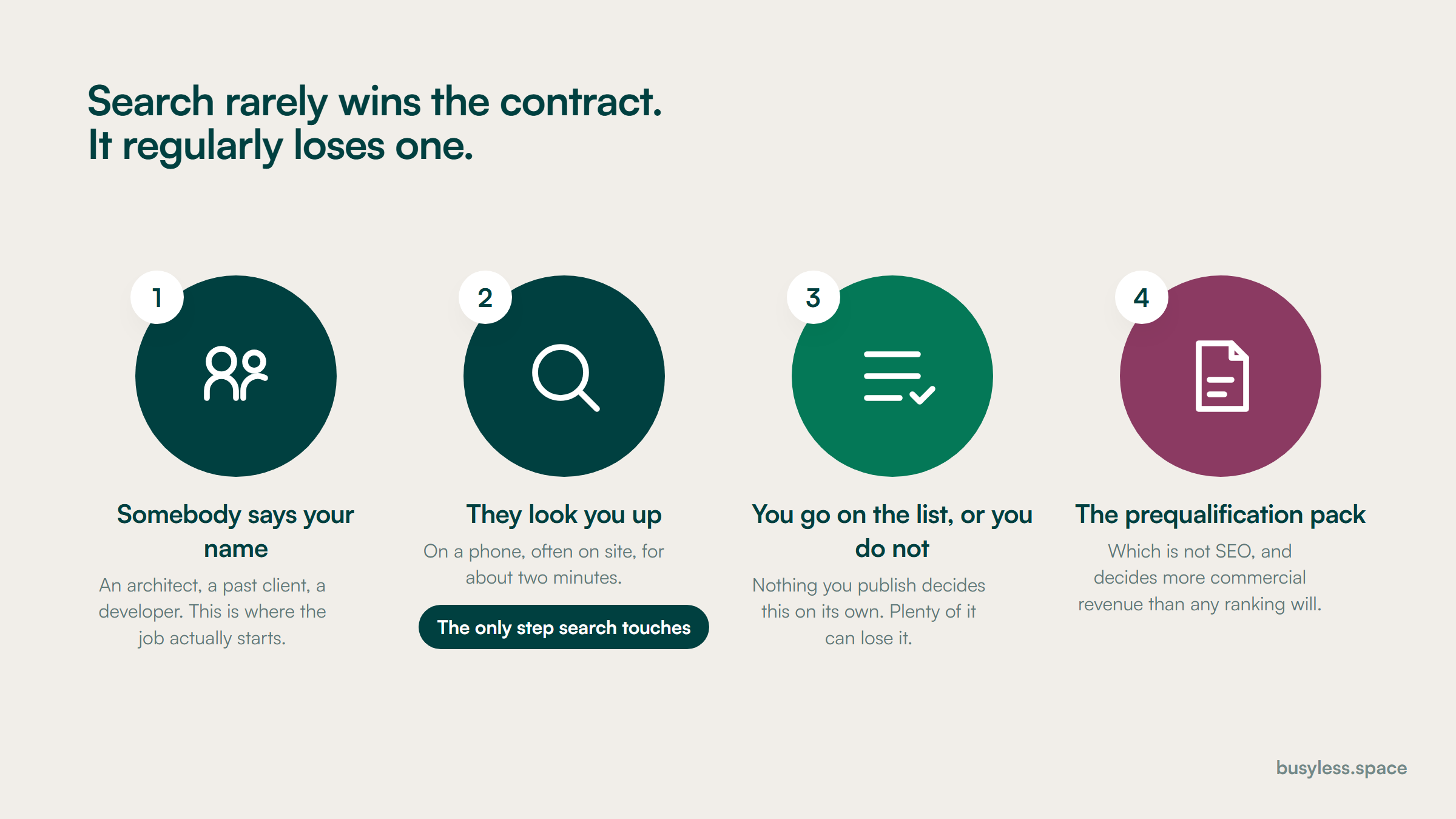
Four steps in how a construction firm gets on a list. Somebody says the name, they look the firm up on a phone, the firm goes on the shortlist or does not, and then the prequalification pack. The second step is flagged as the only one search touches.
One of these four is a search result. Optimise for that moment before optimising for discovery.

What the rules change

Construction is regulated as a trade rather than as a profession, so there is no advertising board reviewing your copy. What there is instead is a licensing geography that most websites quietly break, and a federal certification with rules about how you may show it. Check your own state boards; none of this is legal advice.

1

Advertising in a state where you hold no licence

State contractor licensing statutes, which are separate in every state; California's Contractors State License Board and its equivalents each treat holding yourself out as a contractor as regulated conduct

What it means

Contractor licensing is per state and sometimes per municipality, and offering to perform work generally requires a licence in the place the work is. A service-area page saying you serve a neighbouring state, or a footer listing markets you have never been licensed in, is an advertisement in that state. Firms near a state line do this constantly without ever deciding to.

So do this

List every state and market your site claims, and check it against the licences you actually hold. Delete the ones you do not, or say plainly that you work there in partnership with a licensed local firm and name it. Then keep the list and the licences in the same document so they cannot drift.

2

Lead-safe certification is required, and the logo has usage rules

US Environmental Protection Agency Renovation, Repair and Painting Rule, 40 CFR Part 745 Subpart E

What it means

Firms performing renovation, repair or painting that disturbs paint in most pre-1978 housing and child-occupied facilities must be EPA lead-safe certified, and individual renovators must be trained. The rule also governs the certification logo and how firms may represent the certification, so an uncertified firm using the mark is a distinct problem from an uncertified firm doing the work.

So do this

If you touch pre-1978 housing, put the firm certification number in text on the site, not just the logo. If you are not certified and your portfolio shows period properties, that gap is visible to anybody who knows the rule, including a competitor.

3

"Licensed, bonded and insured" is a claim you have to be able to substantiate

Federal Trade Commission Act section 5 on deceptive practices, and state home improvement contractor statutes

What it means

It is the most common sentence on construction websites and frequently the least examined. Bonding is often a licence bond rather than a performance bond, insurance limits are rarely stated, and both lapse. A client who discovers the difference after a dispute has a complaint about the advertising as well as the work.

So do this

State the specifics instead: licence numbers with states, bond type and amount, general liability and workers compensation limits, and whether a certificate is available on request. Specific is both safer and more persuasive than the sentence everybody uses.

4

Safety and prequalification grades are published by somebody else

Third-party prequalification platforms and insurer-issued experience modification rates

What it means

Your experience modification rate and your prequalification grades are held by parties other than you, and clients can see them. A website claiming an exemplary safety record that a platform contradicts is worse than a website that says nothing, because the discrepancy is the thing they will remember.

So do this

Only publish safety figures you can source and date, name where they come from, and update them when the platform does. If the record has a bad year in it, explaining what changed reads better than an unsupported superlative.

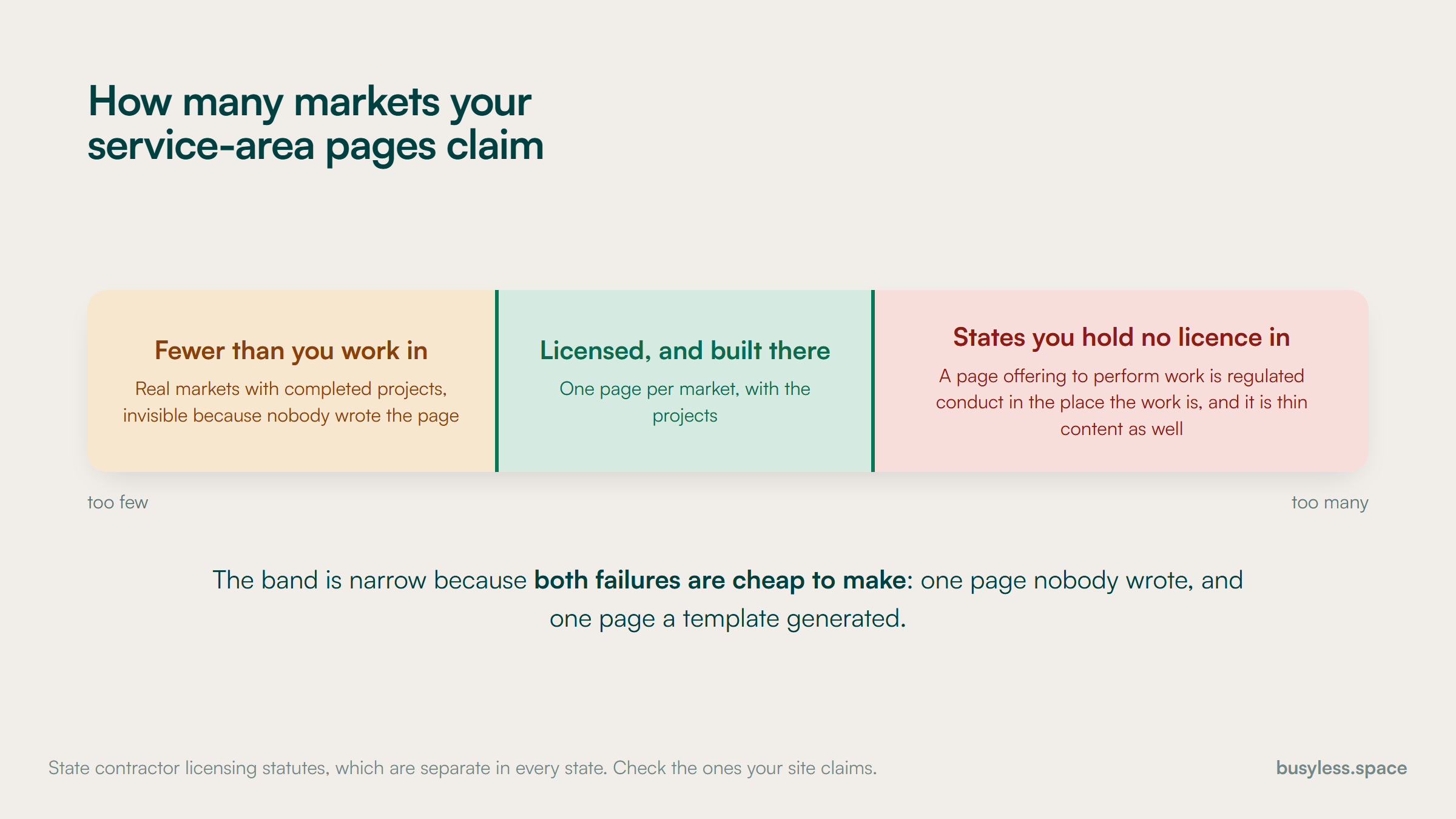
A band with a different failure at each end. Claiming fewer markets than you work in leaves real projects invisible. Claiming states you hold no licence in is regulated conduct as well as thin content. The safe band in the middle is markets where you are licensed and have built.
Both failures are cheap to make, which is why the band is narrow: one page nobody wrote, one page a template generated.

Proving expertise

The trust signals here are institutional rather than personal, and they are exactly what a client checks in the ninety seconds after somebody recommends you. Most construction sites lead with photographs and bury every one of these on a page nobody visits.

  • Licence numbers with the state and classification for every jurisdiction you work in
  • Bond type and amount, and general liability and workers compensation limits, in text
  • Prequalification platform registrations named, with grades where they are good and current
  • Safety record sourced and dated, or omitted entirely rather than asserted
  • Named project managers and superintendents with the projects they ran
  • Completed projects with location, scale, budget band, duration and the client's sector
  • Association memberships stated as memberships, and certifications stated with the awarding body
  • Years trading, ownership and any change of trading name, since the licence register shows it anyway

How to build a construction SEO strategy

A realistic first year, and it is a year rather than a quarter. A construction SEO strategy that promises movement in three months has misunderstood the buying cycle: projects are budgeted a year out and shortlists are assembled from names people already know.

  1. 1

    Weeks 1 to 4

    Survive the diligence check

    • Audit every state and market the site claims against the licences you actually hold
    • Put licence numbers, bond details and insurance limits into text on a credentials page
    • Check your public licence register entry matches the site: name, classification, status
    • Complete or correct your prequalification platform records
    • Complete the Google Business Profile, and claim Houzz and the association directories
    • Fix the contact route, because construction sites are notorious for burying it

    You end up with
    A site that answers a client's diligence questions without them having to ask

  2. 2

    Weeks 4 to 12

    Turn the portfolio into pages

    • Give every completed project its own URL with location, scale, budget band and duration
    • Write what the project actually involved, including a constraint you had to solve
    • Compress and caption the photography properly, with alt text describing the work
    • Group projects into sector and project-type pages that link to the real examples
    • Add GeneralContractor and Service structured data with a licence-bounded service area
    • Publish the cost per square foot ranges for your own market

    You end up with
    A portfolio that exists as indexable pages rather than a gallery, and a real cost page

  3. 3

    Months 3 to 8

    Own the local questions

    • Write permit and zoning explainers for each jurisdiction you build in, dated
    • Write the delivery method comparisons honestly, including when to choose the other one
    • Publish the vetting guide, including the questions you would rather not be asked
    • Explain financing, draws, allowances and change orders in plain language
    • Build sector pages for the commercial work you actually want more of
    • Add named project managers and superintendents to the projects they ran

    You end up with
    Coverage of the questions clients research before they contact anybody

  4. 4

    Months 6 to 12

    Measure enquiries and bid invitations

    • Track qualified enquiries by project type and by source, not sessions
    • Track bid invitations separately, including those that came from plan rooms
    • Ask every new client where they first heard the name, and record it consistently
    • Report leading and business indicators separately with the attribution gap stated
    • Review permit and zoning pages against the current rules, which change
    • Decide whether the residential marketplaces are worth their subscription

    You end up with
    A picture of where work originates that is honest about how much of it search touched

Technical fixes with the best payoff

Construction websites have a distinctive failure mode, and it comes from being designed rather than built. They are beautiful, they are photograph-led, and they frequently have almost no addressable content at all.

  • The whole site is one scrolling page

    A sprint

    Design-led construction sites are often a single URL with sections. That means one title, one description and one page to rank, for a firm with fifteen project types across four sectors. There is nowhere for any query to land.

    Break it into real pages with their own URLs, titles and descriptions: one per sector, one per project type, one per project. Keep the design. The scroll can remain on the home page.

  • The portfolio is a lightbox with no words

    A sprint, then one per completed project

    It is the most persuasive asset the firm has and it is completely invisible. No URLs, no captions, no locations, no scale, no dates, and often no alt text, so it cannot rank in image results either.

    One page per project with the facts a client wants: where, how big, how long, what it cost in bands, what the constraint was, who ran it. Photographs sit inside that page rather than replacing it.

  • The photography is enormous

    A day

    A portfolio site is mostly images, and construction photography arrives from the photographer at print resolution. Pages of twelve megabyte images are common, and the client checking you on a phone at a site meeting gives up.

    Compress, serve modern formats, size responsively and lazy-load below the fold. Set width and height so the layout does not jump. This is usually the single largest performance gain available.

  • Service-area pages claim states you are not licensed in

    A day, mostly deletion

    It is a compliance problem before it is an SEO problem, and it is also a thin-content problem: those pages are usually a template with the city swapped, which is the doorway pattern.

    Cut the list to jurisdictions where you hold a licence and have completed work. One page per real market, with the projects you built there. Everything else comes down.

  • Credentials are a row of logos

    An afternoon

    Licence numbers, bond details, insurance limits, prequalification grades and certifications are exactly what a client is looking for, and rendering them as images means none of it is text on the page or available to an assistant summarising you.

    A credentials page with everything in writing: numbers, states, classifications, limits, platforms, dates. It is the least designed page on the site and one of the most read.

  • Nobody is named anywhere

    A day

    Construction is bought on people. Clients want to know who will actually run the job, and a site with no project managers, no superintendents and a stock photograph on the about page answers none of that.

    Name the team, with the projects each person ran and how long they have been with the firm. Link the project pages to the people who delivered them.

  • There is no way to contact you from a phone

    An afternoon

    The diligence check happens on a phone, often on site, and construction sites routinely hide the phone number behind a contact page and a form. The reader was ready to call and now they are not.

    A tappable number in the header on mobile, an office address, and a named person to ask for. A form is a supplement, not the route.

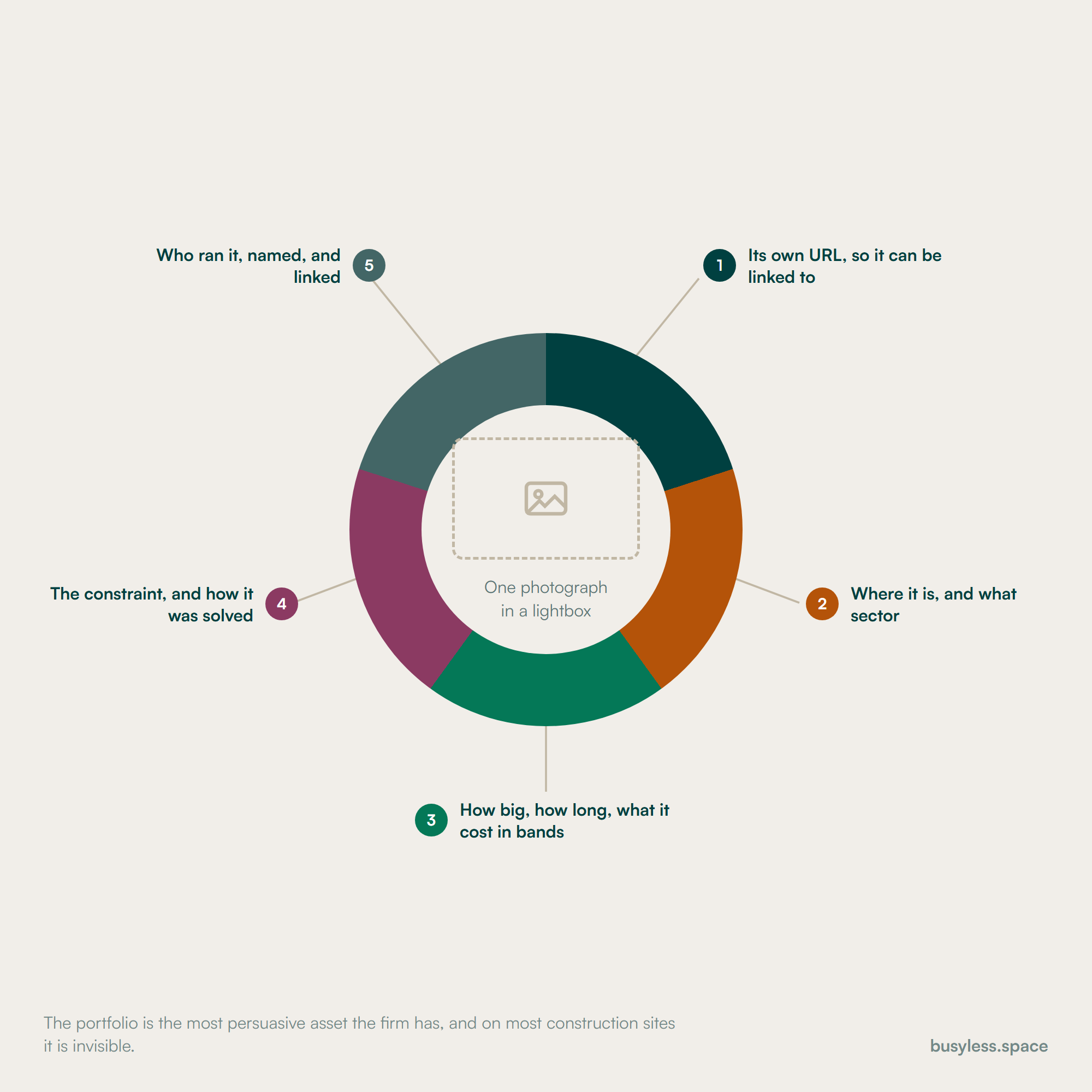
An empty image frame at the centre of a ring, labelled one photograph in a lightbox, with five callouts naming what has to be added: its own URL, where it is and what sector, how big and how long and what it cost in bands, the constraint and how it was solved, and who ran it.
Five things, none of them a design decision. Without them the most persuasive asset the firm has is invisible.

Structured data that applies here

The types below fit this industry specifically. Most of them earn no rich result on their own, which is worth knowing before anyone sells the work on that basis. What they do is describe the entity precisely, which matters for how search engines and answer engines resolve who you are.

  • GeneralContractor

    Home page and any office location pages

    GeneralContractor exists in the vocabulary, so there is no reason to settle for a generic node. Make areaServed match the licences you hold rather than the markets you would like.

    GeneralContractor.jsonld
    {
      "@context": "https://schema.org",
      "@type": "GeneralContractor",
      "@id": "https://[YOUR-DOMAIN]/#business",
      "name": "[FIRM NAME]",
      "url": "https://[YOUR-DOMAIN]",
      "telephone": "[+1-555-000-0000]",
      "foundingDate": "[YYYY]",
      "image": "https://[YOUR-DOMAIN]/office.jpg",
      "address": {
        "@type": "PostalAddress",
        "streetAddress": "[123 Example St]",
        "addressLocality": "[CITY]",
        "addressRegion": "[ST]",
        "postalCode": "[00000]",
        "addressCountry": "US"
      },
      "areaServed": [
        { "@type": "State", "name": "[STATE YOU ARE LICENSED IN]" },
        { "@type": "AdministrativeArea", "name": "[COUNTY]" }
      ],
      "knowsAbout": ["[Custom homes]", "[Healthcare fit-out]", "[Tenant improvement]"],
      "hasCredential": [{
        "@type": "EducationalOccupationalCredential",
        "credentialCategory": "General contractor licence",
        "identifier": "[LICENCE NUMBER]",
        "recognizedBy": {
          "@type": "GovernmentOrganization",
          "name": "[STATE LICENSING BOARD]"
        }
      }]
    }
  • Service, bounded to licensed areas

    Each project-type or sector page

    The areaServed value on this node is a public statement about where you offer to work. Keep it identical to the list on your credentials page, so the markup and the compliance answer cannot diverge.

    Service, bounded to licensed areas.jsonld
    {
      "@context": "https://schema.org",
      "@type": "Service",
      "name": "[PROJECT TYPE, in the client's words]",
      "serviceType": "[Design build / general contracting / tenant improvement]",
      "provider": { "@id": "https://[YOUR-DOMAIN]/#business" },
      "areaServed": [
        { "@type": "State", "name": "[ONLY STATES YOU ARE LICENSED IN]" }
      ],
      "audience": {
        "@type": "Audience",
        "audienceType": "[Homeowners / developers / facilities managers]"
      },
      "hasOfferCatalog": {
        "@type": "OfferCatalog",
        "name": "[PROJECT TYPES]",
        "itemListElement": [
          { "@type": "Offer", "itemOffered": { "@type": "Service", "name": "[TYPE]" } }
        ]
      },
      "description": "[One plain sentence. What you build and for whom.]"
    }
  • Organization credentials block

    The credentials page

    The node that carries what a client is actually checking. Only publish what you can evidence, and update it when a licence or a grade changes rather than when somebody remembers.

    Organization credentials block.jsonld
    {
      "@context": "https://schema.org",
      "@type": "Organization",
      "@id": "https://[YOUR-DOMAIN]/#business",
      "name": "[FIRM NAME]",
      "legalName": "[REGISTERED ENTITY NAME]",
      "foundingDate": "[YYYY]",
      "numberOfEmployees": {
        "@type": "QuantitativeValue",
        "value": "[00]"
      },
      "hasCredential": [
        {
          "@type": "EducationalOccupationalCredential",
          "credentialCategory": "General contractor licence",
          "identifier": "[NUMBER]",
          "recognizedBy": { "@type": "GovernmentOrganization", "name": "[STATE BOARD]" }
        },
        {
          "@type": "EducationalOccupationalCredential",
          "credentialCategory": "EPA lead-safe firm certification",
          "identifier": "[NUMBER]",
          "recognizedBy": { "@type": "GovernmentOrganization", "name": "US Environmental Protection Agency" }
        }
      ],
      "memberOf": [
        { "@type": "Organization", "name": "[ASSOCIATION]" }
      ]
    }
  • VideoObject

    Project walkthroughs, time-lapses and site tours

    Worth doing here specifically because video is the proof format construction already produces and almost never marks up. A described video with a transcript is eligible for video results; an unlabelled embed is not.

    VideoObject.jsonld
    {
      "@context": "https://schema.org",
      "@type": "VideoObject",
      "name": "[PROJECT NAME] walkthrough",
      "description": "[What the video shows: the building, the scope, the constraint you solved.]",
      "thumbnailUrl": "https://[YOUR-DOMAIN]/projects/[SLUG]/thumb.jpg",
      "uploadDate": "[YYYY-MM-DD]",
      "duration": "PT[0]M[00]S",
      "contentUrl": "https://[YOUR-DOMAIN]/projects/[SLUG]/walkthrough.mp4",
      "embedUrl": "[EMBED URL IF HOSTED ELSEWHERE]",
      "transcript": "[Paste the narration. This is what makes the video searchable.]",
      "publisher": { "@id": "https://[YOUR-DOMAIN]/#business" }
    }
  • FAQPage

    Cost, process and permit pages with genuinely visible questions

    Mark up only questions a visitor can see, with answers matching the visible text. Put the financing and change-order questions in first, because those are what clients are anxious about.

    FAQPage.jsonld
    {
      "@context": "https://schema.org",
      "@type": "FAQPage",
      "mainEntity": [
        {
          "@type": "Question",
          "name": "[Question exactly as it appears on the page]",
          "acceptedAnswer": {
            "@type": "Answer",
            "text": "[Answer exactly as it appears on the page. Give a real range or a real timeline.]"
          }
        }
      ]
    }
  • BreadcrumbList

    Project, sector and jurisdiction pages

    Do this once the portfolio is a real hierarchy of sectors, project types and individual projects. If you cannot build the breadcrumb, that is the finding: the site has no structure.

    BreadcrumbList.jsonld
    {
      "@context": "https://schema.org",
      "@type": "BreadcrumbList",
      "itemListElement": [
        { "@type": "ListItem", "position": 1, "name": "Home",
          "item": "https://[YOUR-DOMAIN]/" },
        { "@type": "ListItem", "position": 2, "name": "[SECTOR]",
          "item": "https://[YOUR-DOMAIN]/sectors/[SLUG]" },
        { "@type": "ListItem", "position": 3, "name": "[PROJECT]",
          "item": "https://[YOUR-DOMAIN]/projects/[SLUG]" }
      ]
    }

What it costs

Editorial estimates rather than quotes, and the honest framing here is different from the trades. You are not buying lead volume. You are buying a site that survives diligence, a portfolio that exists as pages, and coverage of a narrow band of research queries. Judge it on those, because the contract still arrives through a relationship.

Lean

$1,500 to $3,000
  • The credentials and licensed-area work done properly and kept current
  • The portfolio converted into real project pages, a few at a time
  • The local cost page and the delivery method comparisons
  • Profile, Houzz and association directory listings maintained
  • Quarterly reporting on enquiries by project type rather than sessions

Who it suits

A residential builder or small general contractor whose work is mostly referred and who wants to stop losing it at the look-you-up stage

Where it stops

It will not generate a pipeline. It makes the pipeline you already have convert better, which is a smaller claim and a truer one.

Funded

$3,500 to $8,000
  • A project page for every completed job, published as they complete
  • Permit and zoning coverage for every jurisdiction you build in
  • Sector pages built for the commercial work you want more of
  • Video walkthroughs marked up and transcribed
  • Enquiry attribution reconciled with what clients actually say when asked

Who it suits

Firms with a real sector strategy, or residential builders in markets where zoning changes are creating new demand

Where it stops

The commercial half of your revenue still comes through plan rooms and prequalification. This tier does not touch that, and no SEO budget will.

Enterprise

$8,000 and up
  • A portfolio managed as structured data, so a project publishes once and appears everywhere
  • Multi-market coverage with licence status tracked per jurisdiction
  • Original market research and reporting, which is what earns links in this sector
  • Recruitment content, which for larger contractors is worth as much as client acquisition
  • Per-sector and per-market reporting rather than a single blended number

Who it suits

Multi-state contractors, or firms where hiring is the binding constraint rather than work

Where it stops

At this size the differentiator stops being content and becomes whether the projects and the people are genuinely better. Search can only report that honestly.

How to do it with no budget

Most of the value available to a construction firm costs nothing but attention, because the problem is usually missing information rather than missing budget.

  1. 1

    Audit your claimed service area against your licences

    2 hours

    Your site, and each state's licence register

    List every state and market the site claims and check it against what you hold. Do this first, because it is the only item here that can be a compliance problem rather than a missed opportunity.

  2. 2

    Write the credentials page

    2 hours

    Your website editor

    Licence numbers, states, classifications, bond type and amount, insurance limits, prequalification platforms, certifications. In text. It is the least designed page on the site and one of the most read.

  3. 3

    Check your public licence register entry

    30 minutes

    Your state board's lookup

    It often ranks for your company name plus licence, and it is what a cautious client compares your site against. A stale trading name there reads as a warning.

  4. 4

    Fix the phone number

    1 hour

    Your website

    A tappable number in the mobile header, an address, and a named person to ask for. The diligence check happens on a phone and often ends because there was nothing to press.

  5. 5

    Publish five projects as real pages

    2 hours each

    Your website editor

    Location, scale, duration, budget band, sector, the constraint you solved, who ran it. Start with the five you most want more of, not the five you are proudest of.

  6. 6

    Complete Houzz and the association directories

    3 hours

    Each platform

    Free, high authority, and for residential work Houzz is a second portfolio rather than a listing. Upload real projects with full descriptions rather than a logo and a phone number.

  7. 7

    Write the permit explainer for your main jurisdiction

    3 hours

    Your website editor and your own permit office

    Genuinely local, actively changing in many states, and it reaches people at the moment a project becomes real. It is the strongest free content available to a residential builder.

The tool stack

Jobs first, tools second. Construction needs less SEO tooling than most industries here and more discipline about administration, because the highest-value records are in plan rooms and prequalification systems rather than in a rank tracker.

  • Track visibility on project type and sector queries

    DataForSEOSEO APIRead the review

    Useful once you are covering several markets or sectors. For a single-market residential builder it is usually more instrumentation than the decision requires.

    Free routeSearch Console covers most of what a single-market firm needs

  • Find the permit, zoning and process questions worth answering

    Google Search Console plus your own enquiry log

    Write down the questions clients ask on the first call. That is the content plan, and it is more accurate than any tool for a business with this few transactions.

    Free routeBoth free, and the enquiry log is the better source

  • Model what a project enquiry from search is worth

    SEO Revenue Growth CalculatorFree toolOpen the tool

    Use contribution rather than contract value, and use a realistic close rate. In construction a small number of very large jobs makes averages misleading, so run a range rather than a point estimate.

    Free routeFree

  • Price a support channel honestly, not a pipeline

    SEO Budget CalculatorFree toolOpen the tool

    A sanity check against the tiers above. Present it alongside the honest statement that search is a support channel here, not the pipeline.

    Free routeFree

  • Generate the GeneralContractor and Service markup

    Schema Markup GeneratorFree toolOpen the tool

    Generate it, validate it, and make sure areaServed matches the licences on your credentials page rather than the markets you would like to serve.

    Free routeFree

  • Publish a portfolio as structured content rather than a gallery

    SanityHeadless CMSRead the review

    Projects, sectors, markets and people are related entities, and a project should publish once and appear on its own page, its sector page and its market page. That relationship is the thing a gallery plugin cannot express.

    Free routeFree tier is adequate for a portfolio of this size

  • Keep prequalification and plan room records current

    Your prequalification platform and plan room subscriptions

    Not an SEO tool and it belongs on this list anyway, because for commercial work it is worth more than anything else here. Put a named owner and a quarterly date against it.

  • See how AI assistants describe your firm

    LLM visibility trackerOur toolSee the tool

    The diligence check increasingly starts with an assistant rather than a search. What it says about you is assembled from your credentials page, your register entry and your project descriptions, which is a reason to have all three in text.

Take it from here

Everything below is yours to take. Fill the [BRACKETS] and it is ready to use. Start with the licensed service area audit: it is the only item here that closes an exposure rather than opening an opportunity.

Checklist

Checks every market your website claims against the licences you actually hold. Contractor licensing is per state, and a page saying you serve a market is an advertisement in it.

LICENSED SERVICE AREA AUDIT - [FIRM] - [DATE]

WHY THIS IS FIRST
Contractor licensing is per state and sometimes per municipality.
A service-area page, a footer list or a schema areaServed value that
names a place you are not licensed in is an advertisement there.
Firms near a state line do this without ever deciding to.

1. WHAT THE SITE CURRENTLY CLAIMS
   Check ALL of these, not just the obvious ones:
   [ ] Service area pages
   [ ] Footer "areas we serve" list
   [ ] Home page copy
   [ ] Google Business Profile service areas
   [ ] Structured data areaServed values
   [ ] Directory and marketplace profiles
   [ ] Project pages tagged with a location

   | Place claimed   | Where it appears | Licensed there? | Evidence |
   |-----------------|------------------|-----------------|----------|
   | [_____________] | [______________] | [ Y / N ]       | [______] |
   | [_____________] | [______________] | [ Y / N ]       | [______] |
   | [_____________] | [______________] | [ Y / N ]       | [______] |
   | [_____________] | [______________] | [ Y / N ]       | [______] |
   | [_____________] | [______________] | [ Y / N ]       | [______] |

2. THE LICENCES YOU ACTUALLY HOLD
   | State / authority | Number | Class | Expires | Named licensee |
   |-------------------|--------|-------|---------|----------------|
   | [_______________] | [____] | [___] | [_____] | [____________] |
   | [_______________] | [____] | [___] | [_____] | [____________] |
   | [_______________] | [____] | [___] | [_____] | [____________] |

3. RESOLVE EVERY MISMATCH
   For each place claimed but not licensed, pick one:
   [ ] Remove the claim entirely
   [ ] Apply for the licence, and remove the claim until it issues
   [ ] Rewrite as "we work in [PLACE] in partnership with
       [NAMED LICENSED FIRM]", which is a different statement

4. ALSO CHECK
   [ ] Trading name on the licence matches the name on the site
   [ ] Classification covers the work shown in the portfolio
   [ ] EPA lead-safe firm certification, if you touch pre-1978 housing
       Number: [__________]  Expires: [__________]
   [ ] Any local registration required in your main city

5. KEEP IT FROM DRIFTING
   Owner: [__________]
   Review date: [__________] (every renewal cycle)
   The claimed-areas list and the licence list live in the same
   document, so one cannot be updated without the other.

What to publish

The ordering here is how much a page changes a decision somebody is already making. Construction firms tend to write about their values. Clients are trying to find out whether you have built this before, in this place, at this size.

  • Project pages, one per completed job

    One per project, published as it completes

    The proof asset, and the only content a competitor cannot replicate. It also feeds sector pages, market pages and the diligence check at the same time.

  • A local cost page

    Once, reviewed twice a year

    Every client asks, no builder answers, and national aggregators are answering it in your market right now with numbers that are not yours.

  • Permit and zoning explainers

    One per jurisdiction, re-checked yearly

    Hyper-local, changing, and read at the exact moment a project becomes real. Nothing else available to a residential builder is this defensible.

  • Delivery method and contract comparisons

    Once, properly

    Researched before anybody is contacted, and it frames the whole engagement. Being honest about when the other model is better is what makes the page work.

  • The credentials page

    Once, updated whenever anything on it changes

    Not content in the usual sense and probably the highest-converting page on the site, because it is what the diligence check is looking for.

  • Sector pages backed by real projects

    One per sector you genuinely want more of

    Low volume, very high value, read by somebody assembling a bid list. Sector experience is the qualifier, so the page is only as good as the projects behind it.

And what not to

  • Service-area pages for states and markets where you hold no licence
  • A page per town, which is both a doorway pattern and a licensing question here
  • "Licensed, bonded and insured" with no numbers, states, limits or dates behind it
  • Company news, awards nights and charity days, which no client is searching for
  • Safety superlatives that a prequalification platform can contradict
  • Stock photography of somebody else's building, on a site whose entire job is proof
  • General construction industry commentary, which is written for peers rather than clients
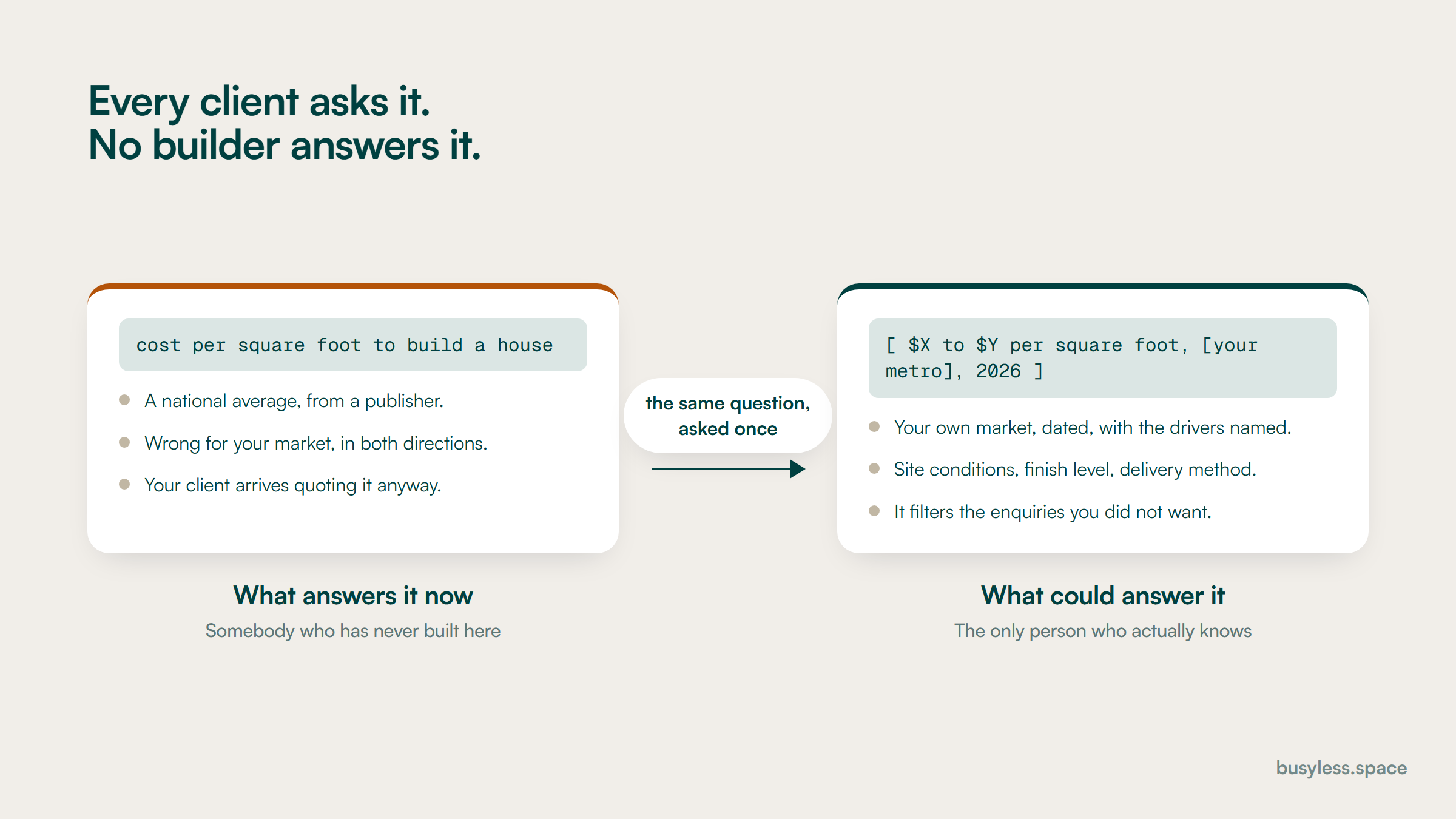
Two panels answering the same query about cost per square foot. On the left a national average from a publisher, wrong for the market in both directions. On the right a dated range for the firm's own metro with the drivers named.
The question gets asked either way. The only choice is whether somebody who has built here is the one answering it.

The expensive mistakes

Expecting search to produce a pipeline

Costs you A programme judged against a target it was never going to hit, cancelled before the parts that do work have compounded

Set the goal as surviving diligence and owning the research queries, and report enquiries by project type rather than volume

Leaving the portfolio in a gallery

Costs you The single most persuasive asset the firm owns, invisible to search and to anybody assembling a shortlist

A page per project with location, scale, duration, budget band and the constraint you solved

Claiming markets you are not licensed in

Costs you A compliance exposure and a set of thin doorway pages, in the same edit

Cut the list to where you hold a licence, and name the local partner where you work through one

Hiding the credentials

Costs you The client checking you after a referral leaves without the answer, and you never find out it happened

A plain credentials page with numbers, limits, platforms and dates, linked from the navigation

Neglecting the plan room and prequalification records

Costs you Bid invitations that never arrive, which is the most invisible loss in this industry

A named owner and a quarterly review, treated with the same seriousness as the website

Reporting sessions to a construction owner

Costs you A budget cut in the first slow quarter, because nothing in the report resembles a project

Qualified enquiries and bid invitations by project type and sector, with the attribution gap stated

What to measure

This is the hardest industry in this directory to attribute honestly, and pretending otherwise is how these programmes lose credibility. Cycles run a year or more, the deal usually starts with a person rather than a page, and the sample size is small enough that one contract distorts everything.

Leading indicators

Move first. They predict, they do not prove.

  • Brand and firm-name search volume

    Search Console, filtered to your own name

    The clearest signal that referrals are happening, and an early indicator of the diligence traffic this page is mostly about. Watch the trend, not the number.

  • Impressions on project-type and sector queries

    Search Console, filtered by cluster

    Slow moving and the right measure for the portfolio work. Expect quarters, not weeks, and expect the sector queries to have tiny volume and high value.

  • Credentials and project page engagement

    Analytics, on the specific pages

    An unusual metric to report and a useful one here, because those two page types are what the diligence visit is looking for. Rising time on the credentials page usually precedes an enquiry.

  • Permit and zoning page impressions

    Search Console, filtered to jurisdiction pages

    The cluster that produces genuinely new demand for residential builders. It also tells you when a local rule change has created a spike worth writing about.

Business indicators

The ones a manager acts on.

  • Qualified enquiries by project type

    Your enquiry log, with somebody qualifying them

    Raw form fills are useless in construction, where a large share are suppliers and job applicants. Qualification has to be a human step and it has to be consistent.

  • Bid invitations, and where they came from

    Estimating log

    Track plan rooms and prequalification separately from search. It keeps everyone honest about which channel is producing the commercial pipeline.

  • First-touch source, asked directly

    The question every new client is asked, recorded consistently

    The most reliable data available in this industry and the most frequently skipped. One question, asked the same way every time, beats any analytics configuration here.

  • Contract value won, by source

    Your own contract records

    Report it as a range across a rolling period rather than monthly. With this few transactions, a single project makes any monthly figure meaningless.

The verdict

Construction is the industry where I would set the smallest expectations and still recommend doing the work. Search is not going to fill your book. It decides what happens in the ninety seconds after somebody recommends you, and that moment happens far more often than a contract does.

Two things genuinely pay. A portfolio published as real pages, with locations, scale, duration and the constraint you solved, and a credentials page that answers the diligence questions in writing. Both are cheap and both are missing from most construction websites.

Ask anybody pitching construction SEO services these three things before you look at a price. Will they check your claimed service areas against your actual licences? Will they turn the portfolio into pages rather than adding blog posts? Will they say plainly that search is a support channel here?

Promising a pipeline sells better than promising credibility, so the third is where most proposals go soft. I would treat a forecast of leads in SEO services for contractors as a reason to ask harder questions, not as ambition.

FAQ

Construction SEO questions

  • Does SEO actually work for construction companies?
    Not in the way it works for a service trade, and it is worth being straight about that. Most construction work arrives through referrals, repeat clients, architects and procurement lists. What search does is decide what happens in the ninety seconds after somebody recommends you, and it wins a narrow band of research queries: project costs, permit and zoning questions, and delivery method comparisons. Judge a programme on those, not on a lead forecast.
  • Can we have service area pages for nearby states?
    Only where you hold a licence. Contractor licensing is per state and sometimes per municipality, and offering to perform work generally requires a licence in the place the work is, so a page saying you serve a market is an advertisement in it. Audit every place your site claims against the licences you actually hold. Where you work through a licensed local partner, say so and name them.
  • Should we publish a cost per square foot?
    Yes, as a range with the variables listed and a date on it. The objection is that every project is different, which is exactly why the format is a range rather than a number. Refusing to answer does not stop the question; a national cost aggregator answers it with figures that are not yours. Say what the number includes and, more importantly, what it excludes, because that is what most disputes are actually about.
  • What should we do with the portfolio?
    Turn it into pages. On most construction sites the portfolio is a lightbox gallery with no URLs, no captions, no locations and no scale, which means the firm's most persuasive asset is invisible to search. Give every completed project its own page with location, size, contract value band, duration, delivery method and the constraint you solved. That page then feeds the sector page, the market page and the diligence check at once.
  • Are plan rooms and prequalification part of SEO?
    No, and they belong in the same conversation because for commercial work they matter more. Bid networks and prequalification platforms are where a large share of the pipeline is sourced, and an incomplete record costs invitations you never hear about. Put a named owner and a quarterly review date on them, and treat them with the same seriousness as the website.
  • How long before we see anything?
    The diligence work pays back immediately, in the sense that the next person who looks you up finds the answers. The portfolio and content work takes six to twelve months to show in search, and the contracts it influences take longer than that. This is the slowest industry in this directory, and any proposal promising movement in a quarter has misunderstood the buying cycle.
  • What does construction SEO cost?
    The tiers above are editorial estimates rather than quotes. A firm doing this properly is realistically in the $1,500 to $8,000 a month range, driven by how many markets and sectors you cover rather than by company size. Below that you can still do the highest-value items yourself: the licensed area audit, the credentials page and the first few project pages cost time rather than money.
  • Is video worth the effort?
    It is, and mostly for a reason nobody expects: the transcript. A project walkthrough with a published transcript and VideoObject markup becomes searchable text about a building you actually delivered, in your own words. Construction firms already commission this footage and then post it somewhere that contributes nothing to their own site. Publish it on the project page, transcribe it, and mark it up.

Run it yourself, or have someone own it

Everything above is written to be run without us, and the free path is genuinely most of the value for a single-location business. Where these plans stall is almost never the plan. It is that nobody owns it after the first month. That is the job we do, with search as one distribution layer inside a wider system rather than the whole engagement.